Normalization:
Database normalization is a process by which an existing schema is modified to bring its component tables into compliance with a series of progressive normal forms.
The goal of database normalization is to ensure that every non-key column in every table is directly dependent on the key, the whole key and nothing but the key and with this goal come benefits in the form of reduced redundancies, fewer anomalies, and improved efficiencies (While normalization tends to increase the duplication of data, it does not introduce redundancy, which is unnecessary duplication.).
About the Key
Column(s) C is primary key for table T if:
Property 1: All columns in T are functionally dependent on C
Property 2: No subcollection of columns in C (assuming C is a collection of
columns and not just a single column) also has Property 1
Candidate Keys -
Column(s) on which all other columns in table are functionally dependent
Alternate Keys -
Candidate keys not chosen as primary keys
First Normal Form
The first normal form (or 1NF) requires that the values in each column of a table are atomic. By atomic we mean that there are no sets of values within a column.
Second Normal Form
Where the First Normal Form deals with atomicity of data, the Second Normal Form (or 2NF) deals with relationships between composite key columns and non-key columns. The normal forms are progressive, so to achieve Second Normal Form, your tables must already be in First Normal Form.
The second normal form (or 2NF) any non-key columns must depend on the entire primary key. In the case of a composite primary key, this means that a non-key column cannot depend on only part of the composite key.
Third Normal Form
Third Normal Form (3NF) requires that all columns depend directly on the primary key. Tables violate the Third Normal Form when one column depends on another column, which in turn depends on the primary key (a transitive dependency).
One way to identify transitive dependencies is to look at your table and see if any columns would require updating if another column in the table was updated. If such a column exists, it probably violates 3NF.
Boyce-Codd Normal Form (BCNF)
When a relation has more than one candidate key, anomalies may result even though the relation is in 3NF. 3NF does not deal satisfactorily with the case of a relation with overlapping candidate keys i.e. composite candidate keys with at least one attribute in common.
BCNF is based on the concept of a determinant. A determinant is any attribute (simple or composite) on which some other attribute is fully functionally dependent. A relation is in BCNF is, and only if, every determinant is a candidate key.
Consider the following relation and determinants.
R(a,b,c,d)
a,c -> b,d
a,d -> b
To be in BCNF, all valid determinants must be a candidate key. In the relation R, a,c->b,d is the determinate used, so the first determinate is fine.
a,d->b suggests that a,d can be the primary key, which would determine b. However this would not determine c. This is not a candidate key, and thus R is not in BCNF.
Example
• Unnormalised
Grade_report(StudNo,StudName,(Major,Advisor(CourseNo,Ctitle,InstrucName,InstructLocn,Grade)))
• 1NF Remove repeating groups
Student(StudNo,StudName)
StudMajor(StudNo,Major,Advisor)
StudCourse(StudNo,Major,CourseNo,
Ctitle,InstrucName,InstructLocn,Grade)
• 2NF Remove partial key dependencies
Student(StudNo,StudName)
StudMajor(StudNo,Major,Advisor)
StudCourse(StudNo,Major,CourseNo,Grade)
Course(CourseNo,Ctitle,InstrucName,InstructLocn)
• 3NF Remove transitive dependencies
Student(StudNo,StudName)
StudMajor(StudNo,Major,Advisor)
StudCourse(StudNo,Major,CourseNo,Grade)
Course(CourseNo,Ctitle,InstrucName)
Instructor(InstructName,InstructLocn)
• BCNF Every determinant is a candidate key
– Student : only determinant is StudNo
– StudCourse: only determinant is StudNo,Major
– Course: only determinant is CourseNo
– Instructor: only determinant is InstrucName
– StudMajor: the determinants are
StudNo,Major, or
Advisor
Only StudNo,Major is a candidate key.
• BCNF
Student(StudNo,StudName)
StudCourse(StudNo,Major,CourseNo,Grade)
Course(CourseNo,Ctitle,InstrucName)
Instructor(InstructName,InstructLocn)
StudMajor(StudNo,Advisor)
Adviser(Adviser,Major)
A complete normalization of tables is desirable, but you may find that in practice that full normalization can introduce complexity to your design and application. More tables often means more JOIN operations, and in most database management systems (DBMSs) such JOIN operations can be costly, leading to decreased performance. The key lies in finding a balance where the first three normal forms are generally met without creating an exceedingly complicated schema.
Sunday, February 15, 2009


Thursday, February 21, 2008
Difference between Java Beans and Enterprise Java Beans
A Java Bean is a software component written in the Java programming language that conforms to the JavaBeans component specification. The JavaBeans APIs became part of the "core" Java APIs as of the 1.1 release of the JDK. The JavaBeans specification defines a Java-based software component model that adds a number of features to the Java programming language. Some of these features include:
introspection
customization
events
properties
persistence
Java Beans is a specification developed by Sun Microsystems that defines how Java objects interact. An object that conforms to this specification is called a JavaBean, and is similar to an ActiveX control. It can be used by any application that understands the JavaBeans format.
The principal difference between ActiveX controls and JavaBeans are that ActiveX controls can be developed in any programming language but executed only on a Windows platform, whereas JavaBeans can be developed only in Java, but can run on any platform.
Enterprise JavaBeans (EJBs) are Java-based software components that are built to comply with Java's EJB specification and run inside of an EJB container supplied by a J2EE provider. An EJB container provides distributed application functionality such as transaction support, persistence and lifecycle management for the EJBs.
An Enterprise JavaBeansTM (EJB) component, or enterprise bean, is a body of code having fields and methods to implement modules of business logic. You can think of an enterprise bean as a building block that can be used alone or with other enterprise beans to execute business logic on the Java EE server.
introspection
customization
events
properties
persistence
Java Beans is a specification developed by Sun Microsystems that defines how Java objects interact. An object that conforms to this specification is called a JavaBean, and is similar to an ActiveX control. It can be used by any application that understands the JavaBeans format.
The principal difference between ActiveX controls and JavaBeans are that ActiveX controls can be developed in any programming language but executed only on a Windows platform, whereas JavaBeans can be developed only in Java, but can run on any platform.
Enterprise JavaBeans (EJBs) are Java-based software components that are built to comply with Java's EJB specification and run inside of an EJB container supplied by a J2EE provider. An EJB container provides distributed application functionality such as transaction support, persistence and lifecycle management for the EJBs.
An Enterprise JavaBeansTM (EJB) component, or enterprise bean, is a body of code having fields and methods to implement modules of business logic. You can think of an enterprise bean as a building block that can be used alone or with other enterprise beans to execute business logic on the Java EE server.
Saturday, February 16, 2008
Aspect-Oriented Programming and Introduction to AspectJ
Aspect-Oriented ProgrammingIntroduction to AspectJ
Programming paradigms
• Procedural programming
– Executing a set of commands in a given sequence
– Fortran, C, Cobol
• Functional programming
– Evaluating a function defined in terms of other functions
– Lisp, ML, OCaml
• Logic programming
– Proving a theorem by finding values for the free variables
– Prolog
• Object-oriented programming (OOP)
– Organizing a set of objects, each with its own set of responsibilities
– Smalltalk, Java, C++ (to some extent)
• Aspect-oriented programming (AOP)
– Executing code whenever a program shows certain behaviors
– AspectJ (a Java extension)
– Does not replace O-O programming, but rather complements it
Introduction
• Currently, the dominant programming paradigm is object-oriented programming that:
• Object orientation is a clever idea, but has certain limitations
• has been presented as a technology that can fundamentally aid software engineering
• is reflected in the entire spectrum of current software development methodologies and tools
Introduction AOP
• A new programming technique called aspect-oriented programming (AOP):
- makes it possible to clearly express those programs that OOP fail to support
- enables the modularization of crosscutting concerns by supporting a new unit of
• Currently, the dominant programming paradigm is object-oriented programming that:
• Object orientation is a clever idea, but has certain limitations
• has been presented as a technology that can fundamentally aid software engineering
• is reflected in the entire spectrum of current software development methodologies and tools
Introduction AOP
• A new programming technique called aspect-oriented programming (AOP):
- makes it possible to clearly express those programs that OOP fail to support
- enables the modularization of crosscutting concerns by supporting a new unit of
software modularity – aspects – that provide encapsulation for crosscutting concerns
What are aspects?
• The current working definition is (May 99, Gregor Kiczales):
- modular units that cross-cut the structure of other modular units
- units that is defined in terms of partial information from other units
- exist in both design and implementation
Aspect: A distinct feature or element in a problem
Concerns
• AOP is based on the idea that computer systems are better programmed by separately specifying the various concerns of a system
• Separation of concerns is an important software engineering principle guiding all stage of a software development methodology
• Concerns:
are properties or areas of interest
can range from high-level notion to low level-notion
can be functional or nonfunctional (systemic)
The problem
• Some programming tasks cannot be neatly encapsulated in objects, but must be scattered throughout the code
• Examples:
– Logging (tracking program behavior to a file)
– Profiling (determining where a program spends its time)
– Tracing (determining what methods are called when)
– Session tracking, session expiration
– Special security management
• The result is crosscuting code--the necessary code “cuts across” many different classes and methods
Example
class Fraction {
What are aspects?
• The current working definition is (May 99, Gregor Kiczales):
- modular units that cross-cut the structure of other modular units
- units that is defined in terms of partial information from other units
- exist in both design and implementation
Aspect: A distinct feature or element in a problem
Concerns
• AOP is based on the idea that computer systems are better programmed by separately specifying the various concerns of a system
• Separation of concerns is an important software engineering principle guiding all stage of a software development methodology
• Concerns:
are properties or areas of interest
can range from high-level notion to low level-notion
can be functional or nonfunctional (systemic)
The problem
• Some programming tasks cannot be neatly encapsulated in objects, but must be scattered throughout the code
• Examples:
– Logging (tracking program behavior to a file)
– Profiling (determining where a program spends its time)
– Tracing (determining what methods are called when)
– Session tracking, session expiration
– Special security management
• The result is crosscuting code--the necessary code “cuts across” many different classes and methods
Example
class Fraction {
int numerator;
int denominator;
...
public Fraction multiply(Fraction that) {
traceEnter("multiply", new Object[] {that});
Fraction result = new Fraction( this.numerator * that.numerator, this.denominator * that.denominator);
result = result.reduceToLowestTerms();
traceExit("multiply", result);
return result;
}
...
}
Now imagine similar code in every method you might want to trace
Now imagine similar code in every method you might want to trace
Consequences of crosscutting code
• Redundant code
– Same fragment of code in many places
• Difficult to reason about
– Non-explicit structure
– The big picture of the tangling isn’t clear
• Difficult to change
– Have to find all the code involved...
– ...and be sure to change it consistently
– ...and be sure not to break it by accident
• Inefficient when crosscuting code is not needed
AspectJTM
• AspectJ is a small, well-integrated extension to Java
– Based on the 1997 PhD thesis by Christina Lopes, A Language Framework for Distributed Programming
• AspectJ modularizes crosscutting concerns
– That is, code for one aspect of the program (such as tracing) is collected together in one place
• The AspectJ compiler is free and open source
• AspectJ works with JBuilder, Forté, Eclipse, probably others
• Best online writeup: http://www.eclipse.org/aspectj/
Terminology
• A join point is a well-defined point in the program flow
• A pointcut is a group of join points
• Advice is code that is executed at a pointcut
• Introduction modifies the members of a class and the relationships between classes
• An aspect is a module for handling crosscutting concerns
– Aspects are defined in terms of pointcuts, advice, and introduction
– Aspects are reusable and inheritable
• Each of these terms will be discussed in greater detail
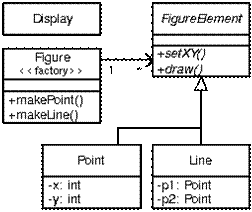
The Figure Element example
Using Objects
• Expressive
– What is going on its clear
• Abstraction
– Focus on more or less detail
• Structure & Modularity
– What goes where
– How parts fit together
–Things are pretty clear, you know every thing about it. If you wanna add new shapes(FigureElement) that also you can add.
–So now lets make it probelamatic… how… Simple Observer Pattern
–If there is any change in the shape…. Drawing Object should be notified.
–So what is this , good design but a worst code.
–So what can we do , we can use aspects , we can have a aspect for observer pattern and which will be weaved with the existing codess and proviides use the way to work with new requirements.
–So we have Good Design and Good Code.
–Lets see how to do that with the help of aspects.
Other Aspects
• Security
– Pointcut for when checking happens
• Optimization
• Distribution
• Synchronization
• Persistance
• And ofcourse Logging/Tracing
• And very many application –specific aspects
- i.e EnsureLiveness
Example I
• A pointcut named move that chooses various method calls:
• Redundant code
– Same fragment of code in many places
• Difficult to reason about
– Non-explicit structure
– The big picture of the tangling isn’t clear
• Difficult to change
– Have to find all the code involved...
– ...and be sure to change it consistently
– ...and be sure not to break it by accident
• Inefficient when crosscuting code is not needed
AspectJTM
• AspectJ is a small, well-integrated extension to Java
– Based on the 1997 PhD thesis by Christina Lopes, A Language Framework for Distributed Programming
• AspectJ modularizes crosscutting concerns
– That is, code for one aspect of the program (such as tracing) is collected together in one place
• The AspectJ compiler is free and open source
• AspectJ works with JBuilder, Forté, Eclipse, probably others
• Best online writeup: http://www.eclipse.org/aspectj/
Terminology
• A join point is a well-defined point in the program flow
• A pointcut is a group of join points
• Advice is code that is executed at a pointcut
• Introduction modifies the members of a class and the relationships between classes
• An aspect is a module for handling crosscutting concerns
– Aspects are defined in terms of pointcuts, advice, and introduction
– Aspects are reusable and inheritable
• Each of these terms will be discussed in greater detail
The Figure Element example

Using Objects
• Expressive
– What is going on its clear
• Abstraction
– Focus on more or less detail
• Structure & Modularity
– What goes where
– How parts fit together
–Things are pretty clear, you know every thing about it. If you wanna add new shapes(FigureElement) that also you can add.
–So now lets make it probelamatic… how… Simple Observer Pattern
–If there is any change in the shape…. Drawing Object should be notified.
–So what is this , good design but a worst code.
–So what can we do , we can use aspects , we can have a aspect for observer pattern and which will be weaved with the existing codess and proviides use the way to work with new requirements.
–So we have Good Design and Good Code.
–Lets see how to do that with the help of aspects.
Other Aspects
• Security
– Pointcut for when checking happens
• Optimization
• Distribution
• Synchronization
• Persistance
• And ofcourse Logging/Tracing
• And very many application –specific aspects
- i.e EnsureLiveness
Example I
• A pointcut named move that chooses various method calls:
pointcut move(): call(void FigureElement.setXY(int,int))||
call(void Point.setX(int))||
call(void Point.setY(int))||
call(void Point.setX(int))||
call(void Point.setY(int))||
call(void Line.setP1(Point))||
call(void Line.setP2(Point));||
• Advice (code) that runs before the move pointcut:
before(): move() {
• Advice (code) that runs before the move pointcut:
before(): move() {
System.out.println("About to move");
}
• Advice that runs after the move pointcut:
• Advice that runs after the move pointcut:
after(): move() {
System.out.println("Just successfully moved");
}
Join points
• A join point is a well-defined point in the program flow
– We want to execute some code (“advice”) each time a join point is reached
– AspectJ provides a syntax for indicating these join points “from outside” the actual code
• A join point is a point in the program flow “where something happens”
– Examples:
• When a method is called
• When an exception is thrown
• When a variable is accessed
AspectJ supports 11 different kinds of join points.These are the method call, method execution, constructor call, constructor execution, field get, field set, pre initialization, initialization, static initialization, handler, and advice execution join points.
Pointcuts
• Pointcut definitions consist of a left-hand side and a right-hand side, separated by a colon
– The left-hand side consists of the pointcut name and the pointcut parameters (i.e. the data available when the events happen)
– The right-hand side consists of the pointcut itself
• Example pointcut:pointcut setter(): call(void setX(int));
– The name of this pointcut is setter
– The pointcut has no parameters
– The pointcut itself is call(void setX(int))
– The pointcut refers to any time the void setX(int) method is called
Join points
• A join point is a well-defined point in the program flow
– We want to execute some code (“advice”) each time a join point is reached
– AspectJ provides a syntax for indicating these join points “from outside” the actual code
• A join point is a point in the program flow “where something happens”
– Examples:
• When a method is called
• When an exception is thrown
• When a variable is accessed
AspectJ supports 11 different kinds of join points.These are the method call, method execution, constructor call, constructor execution, field get, field set, pre initialization, initialization, static initialization, handler, and advice execution join points.
Pointcuts
• Pointcut definitions consist of a left-hand side and a right-hand side, separated by a colon
– The left-hand side consists of the pointcut name and the pointcut parameters (i.e. the data available when the events happen)
– The right-hand side consists of the pointcut itself
• Example pointcut:pointcut setter(): call(void setX(int));
– The name of this pointcut is setter
– The pointcut has no parameters
– The pointcut itself is call(void setX(int))
– The pointcut refers to any time the void setX(int) method is called
Example pointcut designators I
• When a particular method body executes:
– execution(void Point.setX(int))
• When a method is called:
– call(void Point.setX(int))
• When an exception handler executes:
– handler(ArrayOutOfBoundsException)
• When the object currently executing (i.e. this) is of type SomeType:
– this(SomeType)
• When a particular method body executes:
– execution(void Point.setX(int))
• When a method is called:
– call(void Point.setX(int))
• When an exception handler executes:
– handler(ArrayOutOfBoundsException)
• When the object currently executing (i.e. this) is of type SomeType:
– this(SomeType)
Example pointcut designators II
• When the target object is of type SomeType
– target(SomeType)
• When the executing code belongs to class MyClass
– within(MyClass)
• When the join point is in the control flow of a call to a Test's no-argument main method
– cflow(call(void Test.main()))
Pointcut designator wildcards
• It is possible to use wildcards to declare pointcuts:
– execution(* *(..))
• Chooses the execution of any method regardless of return or parameter types
– call(* set(..))
• Chooses the call to any method named set regardless of return or parameter type
• In case of overloading there may be more than one such set method; this pointcut picks out calls to all of them
Pointcut designators based on types
• You can select elements based on types. For example,
– execution(int *())
• Chooses the execution of any method with no parameters that returns an int
– call(* setY(long))
• Chooses the call to any setY method that takes a long as an argument, regardless of return type or declaring type
– call(* Point.setY(int))
• Chooses the call to any of Point’s setY methods that take an int as an argument, regardless of return type
– call(*.new(int, int))
• Chooses the call to any classes’ constructor, so long as it takes exactly two ints as arguments
Pointcut designator composition
• Pointcuts compose through the operations or (“”), and (“&&”) and not (“!”)
• Examples:
– target(Point) && call(int *())
• Chooses any call to an int method with no arguments on an instance of Point, regardless of its name
– call(* *(..)) && (within(Line) within(Point))
• Chooses any call to any method where the call is made from the code in Point’s or Line’s type declaration
– within(*) && execution(*.new(int))
• Chooses the execution of any constructor taking exactly one int argument, regardless of where the call is made from
– !this(Point) && call(int *(..))
• Chooses any method call to an int method when the executing object is any type except Point
Pointcut designators based on modifiers
• call(public * *(..))
– Chooses any call to a public method
• execution(!static * *(..))
– Chooses any execution of a non-static method
• execution(public !static * *(..))
– Chooses any execution of a public, non-static method
• Pointcut designators can be based on interfaces as well as on classes
Example I, repeated
• A pointcut named move that chooses various method calls:
pointcut move(): call(void FigureElement.setXY(int,int))
call (void Point.setX(int))
• When the target object is of type SomeType
– target(SomeType)
• When the executing code belongs to class MyClass
– within(MyClass)
• When the join point is in the control flow of a call to a Test's no-argument main method
– cflow(call(void Test.main()))
Pointcut designator wildcards
• It is possible to use wildcards to declare pointcuts:
– execution(* *(..))
• Chooses the execution of any method regardless of return or parameter types
– call(* set(..))
• Chooses the call to any method named set regardless of return or parameter type
• In case of overloading there may be more than one such set method; this pointcut picks out calls to all of them
Pointcut designators based on types
• You can select elements based on types. For example,
– execution(int *())
• Chooses the execution of any method with no parameters that returns an int
– call(* setY(long))
• Chooses the call to any setY method that takes a long as an argument, regardless of return type or declaring type
– call(* Point.setY(int))
• Chooses the call to any of Point’s setY methods that take an int as an argument, regardless of return type
– call(*.new(int, int))
• Chooses the call to any classes’ constructor, so long as it takes exactly two ints as arguments
Pointcut designator composition
• Pointcuts compose through the operations or (“”), and (“&&”) and not (“!”)
• Examples:
– target(Point) && call(int *())
• Chooses any call to an int method with no arguments on an instance of Point, regardless of its name
– call(* *(..)) && (within(Line) within(Point))
• Chooses any call to any method where the call is made from the code in Point’s or Line’s type declaration
– within(*) && execution(*.new(int))
• Chooses the execution of any constructor taking exactly one int argument, regardless of where the call is made from
– !this(Point) && call(int *(..))
• Chooses any method call to an int method when the executing object is any type except Point
Pointcut designators based on modifiers
• call(public * *(..))
– Chooses any call to a public method
• execution(!static * *(..))
– Chooses any execution of a non-static method
• execution(public !static * *(..))
– Chooses any execution of a public, non-static method
• Pointcut designators can be based on interfaces as well as on classes
Example I, repeated
• A pointcut named move that chooses various method calls:
pointcut move(): call(void FigureElement.setXY(int,int))
call (void Point.setX(int))
call(void Point.setY(int))
call(void Line.setP1(Point))
call(void Line.setP2(Point));
• Advice (code) that runs before the move pointcut:
before(): move() {
• Advice (code) that runs before the move pointcut:
before(): move() {
System.out.println("About to move");
}
• Advice that runs after the move pointcut:
after(): move() {
• Advice that runs after the move pointcut:
after(): move() {
System.out.println("Just successfully moved");
}
Kinds of advice•
AspectJ has several kinds of advice; here are some of them:
– Before advice runs as a join point is reached, before the program proceeds with the join point
– After advice on a particular join point runs after the program proceeds with that join point
• after returning advice is executed after a method returns normally
• after throwing advice is executed after a method returns by throwing an exception
• after advice is executed after a method returns, regardless of whether it returns normally or by throwing an exception
– Around advice on a join point runs as the join point is reached, and has explicit control over whether the program proceeds with the join point
Example II, with parameters
• You can access the context of the join point:
• pointcut setXY(FigureElement fe, int x, int y): call(void FigureElement.setXY(int, int)) && target(fe) && args(x, y);
• after(FigureElement fe, int x, int y) returning: setXY(fe, x, y) { System.out.println(fe + " moved to (" + x + ", " + y + ").");}
Introduction
• An introduction is a member of an aspect, but it defines or modifies a member of type (class). With introduction we can
– add another methods to an existing class
– add fields to an existing class
– extend an existing class with another
– implement an interface in an existing class
– convert checked exceptions into unchecked exceptions
Example introduction
public aspect CloneSimpleClass {
declare parents: SimpleClass2 implements Cloneable;
declare soft: CloneNotSupportedException: execution(Object clone());
public Object SimpleClass2.clone(){ return super.clone();}
}
Kinds of advice•
AspectJ has several kinds of advice; here are some of them:
– Before advice runs as a join point is reached, before the program proceeds with the join point
– After advice on a particular join point runs after the program proceeds with that join point
• after returning advice is executed after a method returns normally
• after throwing advice is executed after a method returns by throwing an exception
• after advice is executed after a method returns, regardless of whether it returns normally or by throwing an exception
– Around advice on a join point runs as the join point is reached, and has explicit control over whether the program proceeds with the join point
Example II, with parameters
• You can access the context of the join point:
• pointcut setXY(FigureElement fe, int x, int y): call(void FigureElement.setXY(int, int)) && target(fe) && args(x, y);
• after(FigureElement fe, int x, int y) returning: setXY(fe, x, y) { System.out.println(fe + " moved to (" + x + ", " + y + ").");}
Introduction
• An introduction is a member of an aspect, but it defines or modifies a member of type (class). With introduction we can
– add another methods to an existing class
– add fields to an existing class
– extend an existing class with another
– implement an interface in an existing class
– convert checked exceptions into unchecked exceptions
Example introduction
public aspect CloneSimpleClass {
declare parents: SimpleClass2 implements Cloneable;
declare soft: CloneNotSupportedException: execution(Object clone());
public Object SimpleClass2.clone(){ return super.clone();}
}
/*
* 1. Class which does not implement CloneNotSupportedException, expected output is
* sucessful running of the method calls because we have aspect for cloning.
*/
public class SimpleClass2 {
private String name=null;
public SimpleClass2(String s){
name = s;
}
* 1. Class which does not implement CloneNotSupportedException, expected output is
* sucessful running of the method calls because we have aspect for cloning.
*/
public class SimpleClass2 {
private String name=null;
public SimpleClass2(String s){
name = s;
}
public static void main(String[] args) {
SimpleClass2 ref1 = new SimpleClass2("Demo");
ref1.funtion();
try {
SimpleClass2 ref2 = (SimpleClass2) ref1.clone();
ref2.funtion();
} catch (Exception e) {
e.printStackTrace();
}
}
private void funtion() {
System.out.println("Name is "+name);
}
}
So what this does, it adds a functionality for cloning to a non
Cloneable class. Deciding about the feature enancement
during runtime …. Amazing capability in the product….
SimpleClass2 ref1 = new SimpleClass2("Demo");
ref1.funtion();
try {
SimpleClass2 ref2 = (SimpleClass2) ref1.clone();
ref2.funtion();
} catch (Exception e) {
e.printStackTrace();
}
}
private void funtion() {
System.out.println("Name is "+name);
}
}
So what this does, it adds a functionality for cloning to a non
Cloneable class. Deciding about the feature enancement
during runtime …. Amazing capability in the product….
Approximate syntax
• An aspect is: aspect nameOfAspect { body }
– An aspect contains introductions, pointcuts, and advice
• A pointcut designator is: when(signature)
– The signature includes the return type
– The “when” is call, handler, execution, etc.
• A named pointcut designator is: name(parameters): pointcutDesignator
• Advice is: adviceType(parameters): pointcutDesignator { body }
• Introductions are basically like normal Java code
Example aspect I
• aspect PointWatching {
private Vector Point.watchers = new Vector();
public static void addWatcher(Point p, Screen s) { p.Watchers.add(s); }
public static void removeWatcher(Point p, Screen s) { p.Watchers.remove(s); }
static void updateWatcher(Point p, Screen s) { s.display(p); }
pointcut changes(Point p): target(p) && call(void Point.set*(int));
after(Point p): changes(p) {
• An aspect is: aspect nameOfAspect { body }
– An aspect contains introductions, pointcuts, and advice
• A pointcut designator is: when(signature)
– The signature includes the return type
– The “when” is call, handler, execution, etc.
• A named pointcut designator is: name(parameters): pointcutDesignator
• Advice is: adviceType(parameters): pointcutDesignator { body }
• Introductions are basically like normal Java code
Example aspect I
• aspect PointWatching {
private Vector Point.watchers = new Vector();
public static void addWatcher(Point p, Screen s) { p.Watchers.add(s); }
public static void removeWatcher(Point p, Screen s) { p.Watchers.remove(s); }
static void updateWatcher(Point p, Screen s) { s.display(p); }
pointcut changes(Point p): target(p) && call(void Point.set*(int));
after(Point p): changes(p) {
Iterator iter = p.Watchers.iterator();
while ( iter.hasNext() ) {
updateWatcher(p, (Screen)iter.next());
} }}
How to identify which aspect is working
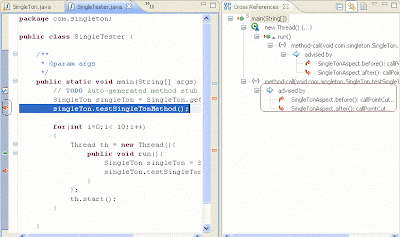
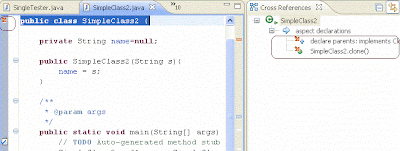
• In case of Introduction, which we applied to SimnpleClass2, aspect scope is for the class
The role of aspects in software design
• AOP aims at providing better means of addressing the well-known problem of separation of concerns
• Three basic approaches to addressing the process of separation of concerns:
Language-based approach
• It is based on the definition of a set of language constructs
• Relevant concerns are identified at the problem domain and translated to aspectual construct
• The final application is obtained by weaving the primary structure with the crosscutting aspects
Framework-based approach
• Provides more flexible constructs
• Concerns are materialized as aspectual classes at the framework level
• Developers can customize these aspects using the mechanism supported by the framework
• These types of framework are known as AO frameworks (explicitly engineers concerns)
Architecture-oriented approach
• Early identification of concerns using architectural organizational models
• Architectural view-point involves a higher level of abstraction than the previous approaches
• It typically comprises two stages
Architecture-oriented approach
• First, developers should determine the problem architecture
• Then, the approach enables several kinds of aspect materialization through different frameworks
How to identify which aspect is working

• In case of Introduction, which we applied to SimnpleClass2, aspect scope is for the class

The role of aspects in software design
• AOP aims at providing better means of addressing the well-known problem of separation of concerns
• Three basic approaches to addressing the process of separation of concerns:
Language-based approach
• It is based on the definition of a set of language constructs
• Relevant concerns are identified at the problem domain and translated to aspectual construct
• The final application is obtained by weaving the primary structure with the crosscutting aspects
Framework-based approach
• Provides more flexible constructs
• Concerns are materialized as aspectual classes at the framework level
• Developers can customize these aspects using the mechanism supported by the framework
• These types of framework are known as AO frameworks (explicitly engineers concerns)
Architecture-oriented approach
• Early identification of concerns using architectural organizational models
• Architectural view-point involves a higher level of abstraction than the previous approaches
• It typically comprises two stages
Architecture-oriented approach
• First, developers should determine the problem architecture
• Then, the approach enables several kinds of aspect materialization through different frameworks
Concluding remarks
• Aspect-oriented programming (AOP) is a new paradigm--a new way to think about programming
• AOP is somewhat similar to event handling, where the “events” are defined outside the code itself
• AspectJ is not itself a complete programming language, but an adjunct to Java
• AspectJ does not add new capabilities to what Java can do, but adds new ways of modularizing the code
• AspectJ is free, open source software
• AspectJ based on Java Features and which includes
– Annotations
– Generics
– Enumerated Types
– AutoBoxing and UnBoxing
– New Reflection Interfaces
– Load Time Weaving
• Aspect-oriented programming (AOP) is a new paradigm--a new way to think about programming
• AOP is somewhat similar to event handling, where the “events” are defined outside the code itself
• AspectJ is not itself a complete programming language, but an adjunct to Java
• AspectJ does not add new capabilities to what Java can do, but adds new ways of modularizing the code
• AspectJ is free, open source software
• AspectJ based on Java Features and which includes
– Annotations
– Generics
– Enumerated Types
– AutoBoxing and UnBoxing
– New Reflection Interfaces
– Load Time Weaving
Will be adding few exampls ............. shortly..........
Sunday, February 3, 2008
Saturday, January 19, 2008
Java Tips for ...novice programmers...
Object-Oriented Programming
• An abstract method cannot (obviously) be final.
• An abstract method cannot be static because static methods cannot be
overridden.
• An instance method can be both protected and abstract. A static method
can be protected.
• The JVM does not call an object’s constructor when you clone the object.
• Classes can be modified from their default state using any of the three
keywords: public, abstract, and final. So, can’t have a static class,
only static methods.
• A final variable is a constant, and a final method cannot be overridden.
• A call to this in a constructor must also be on the first line.
Note: can’t have an explicit call to super followed by a call to this
in a constructor - only one direct call to another constructor is allowed.
Memory and Garbage Collection
• Can’t predict when garbage collection will occur, but it does run
whenever memory gets low.
• If you want to perform some task when your object is about to be
garbage collected, you can override the java.lang.Object method called
finalize(). This method is declared as protected, does not return a value,
and throws a Throwable object, i.e. protected void finalize() throws Throwable.
• Always invoke the superclass’s finalize() method if you override finalize().
• The JVM only invokes finalize() once per object. Since this is the case,
do not resurrect an object in finalize as when the object is finalized
again its finalize() method will not be called. Instead you should create a
clone of the object if you must bring the object back to life.
• Remember that Java passes method parameters by value and not by
reference. Obviously then, anything that happens to a primitive data
type inside a method does not affect the original value in the calling code.
Also, any reassignment of object references inside a method has no effect
on the objects passed in.
Exceptions
• Invoking a method which declares it throws exceptions is not
possible unless either the code is placed in a try-catch, or the calling
method declares that it throws the exceptions, i.e. checked
exceptions must be caught or rethrown. If the try-catch
approach is used, then the try-catch must cope with all of the
exceptions which a method declares it throws.
• RuntimeException and its subclasses are unchecked exceptions.
• Unchecked exceptions do not have to be caught.
• All Errors are unchecked.
• You should never throw an unchecked exception in your own code, even
though the code will compile.
Methods
• A native method does not have a body, or even a set of braces,
e.g. public native void method();
• A native method cannot be abstract.
• A native method can throw exceptions.
• A subclass may make an inherited method synchronized, or it may
leave offthe synchronized keyword so that its version is not synchronized.
If a methodin a subclass is not synchronized but the method in the
superclass is, the threadobtains the monitor for the object when it enters
the superclass’s method.• You cannot make a method in a subclass more
private than it is defined in thesuperclass, ‘though you can make it more public.
Threads
• A Java program runs until the only threads left running are daemon threads.
• A Thread can be set as a user or daemon thread when it is created.
• In a standalone program, your class runs until your main() method
exists - unless your main() method creates more threads.
• You can initiate your own thread of execution by creating a Thread
object, invoking its start() method, and providing the behaviour that
tells the thread what to do. The thread will run until its run() method
exists, after which it will come to a halt - thus ending its life cycle.
• The Thread class, by default, doesn’t provide any behaviour for run().
• A thread has a life cycle. Creating a new Thread instance puts the thread
into the "new thread" state. When the start() method is invoked, the
thread is then "alive" and "runnable". A thread at this point will repond
to the method isAlive () by returning true.
• The thread will continue to return true to isAlive() until it is "dead",
no matter whether it is "runnable" or "not runnable".
• There are 3 types of code that can be synchronized: class methods, i
nstance methods, any block of code within a method.
• Variables cannot take the synchronized keyword.
• Synchronization stays in effect if you enter a synchronized method
and call out to a non-synchronized method. The thread only gives
up the monitor after the synchronized method returns.
Inner Class
• If you define an inner class at the same level as the enclosing class’
instance variables, the inner class can access those instance variables -
no matter what their access control.
• If you define an inner class within a method, the inner class can
access the enclosing class’ instance variables and also the local
variables and parameter for that method.
• If you do reference local variables or parameters from an inner
class, those variables or parameters must be declared as final to
help guarantee data integrity.
• You can also define an anonymous class - a class without a name.
• If you’d like to refer to the current instance of the enclosing class,
you can write EnclosingClassName.this.
• If you need to refer to the inner class using a fully qualified name,
you can write EnclosingClassName.InnerClassName.
• If your inner class is not defined as static you can only create new
instances of this class from a non-static method.
• Anonymous classes cannot have const
Serializing Objects
•It is now possible to read and write objects as well as primitive data
types, using classes that implement ObjectInput and ObjectOutput.
These two interfaces extend DataInput and DataOutput to read or
write an object. ObjectInputStream and ObjectOutputStream
implement these interfaces.
• If a class implements the Serializable interface, then its public and
protected instance variables will be read from and written to the
stream automatically when you use ObjectInputStream and
ObjectOutputStream.
• If an instance variable refers to another object, it will also be
read or written, and this continues recursively.
• If the referenced object does not implement the Serializable
interface, Java will throw a NotSerializableException.
• The Serializable interface serves only to identify those instances
of a particular class that can be read from and written to a stream.
It does not actually define any methods that you must implement.
• If you create your own class and want to keep certain data from
being read or written, you can declare that instance variable
using the transient keyword. Java skips any variable declared as
transient when it reads and writes the object following the Serializable
protocol.
Reflection
• Using the Reflection API, a program can determine a class’ accessible
fields, methods and constructors at runtime.
will be adding moreeeeeeeeeeeee later, guys....... you are also free to add comments on this and more points........
• An abstract method cannot (obviously) be final.
• An abstract method cannot be static because static methods cannot be
overridden.
• An instance method can be both protected and abstract. A static method
can be protected.
• The JVM does not call an object’s constructor when you clone the object.
• Classes can be modified from their default state using any of the three
keywords: public, abstract, and final. So, can’t have a static class,
only static methods.
• A final variable is a constant, and a final method cannot be overridden.
• A call to this in a constructor must also be on the first line.
Note: can’t have an explicit call to super followed by a call to this
in a constructor - only one direct call to another constructor is allowed.
Memory and Garbage Collection
• Can’t predict when garbage collection will occur, but it does run
whenever memory gets low.
• If you want to perform some task when your object is about to be
garbage collected, you can override the java.lang.Object method called
finalize(). This method is declared as protected, does not return a value,
and throws a Throwable object, i.e. protected void finalize() throws Throwable.
• Always invoke the superclass’s finalize() method if you override finalize().
• The JVM only invokes finalize() once per object. Since this is the case,
do not resurrect an object in finalize as when the object is finalized
again its finalize() method will not be called. Instead you should create a
clone of the object if you must bring the object back to life.
• Remember that Java passes method parameters by value and not by
reference. Obviously then, anything that happens to a primitive data
type inside a method does not affect the original value in the calling code.
Also, any reassignment of object references inside a method has no effect
on the objects passed in.
Exceptions
• Invoking a method which declares it throws exceptions is not
possible unless either the code is placed in a try-catch, or the calling
method declares that it throws the exceptions, i.e. checked
exceptions must be caught or rethrown. If the try-catch
approach is used, then the try-catch must cope with all of the
exceptions which a method declares it throws.
• RuntimeException and its subclasses are unchecked exceptions.
• Unchecked exceptions do not have to be caught.
• All Errors are unchecked.
• You should never throw an unchecked exception in your own code, even
though the code will compile.
Methods
• A native method does not have a body, or even a set of braces,
e.g. public native void method();
• A native method cannot be abstract.
• A native method can throw exceptions.
• A subclass may make an inherited method synchronized, or it may
leave offthe synchronized keyword so that its version is not synchronized.
If a methodin a subclass is not synchronized but the method in the
superclass is, the threadobtains the monitor for the object when it enters
the superclass’s method.• You cannot make a method in a subclass more
private than it is defined in thesuperclass, ‘though you can make it more public.
Threads
• A Java program runs until the only threads left running are daemon threads.
• A Thread can be set as a user or daemon thread when it is created.
• In a standalone program, your class runs until your main() method
exists - unless your main() method creates more threads.
• You can initiate your own thread of execution by creating a Thread
object, invoking its start() method, and providing the behaviour that
tells the thread what to do. The thread will run until its run() method
exists, after which it will come to a halt - thus ending its life cycle.
• The Thread class, by default, doesn’t provide any behaviour for run().
• A thread has a life cycle. Creating a new Thread instance puts the thread
into the "new thread" state. When the start() method is invoked, the
thread is then "alive" and "runnable". A thread at this point will repond
to the method isAlive () by returning true.
• The thread will continue to return true to isAlive() until it is "dead",
no matter whether it is "runnable" or "not runnable".
• There are 3 types of code that can be synchronized: class methods, i
nstance methods, any block of code within a method.
• Variables cannot take the synchronized keyword.
• Synchronization stays in effect if you enter a synchronized method
and call out to a non-synchronized method. The thread only gives
up the monitor after the synchronized method returns.
Inner Class
• If you define an inner class at the same level as the enclosing class’
instance variables, the inner class can access those instance variables -
no matter what their access control.
• If you define an inner class within a method, the inner class can
access the enclosing class’ instance variables and also the local
variables and parameter for that method.
• If you do reference local variables or parameters from an inner
class, those variables or parameters must be declared as final to
help guarantee data integrity.
• You can also define an anonymous class - a class without a name.
• If you’d like to refer to the current instance of the enclosing class,
you can write EnclosingClassName.this.
• If you need to refer to the inner class using a fully qualified name,
you can write EnclosingClassName.InnerClassName.
• If your inner class is not defined as static you can only create new
instances of this class from a non-static method.
• Anonymous classes cannot have const
Serializing Objects
•It is now possible to read and write objects as well as primitive data
types, using classes that implement ObjectInput and ObjectOutput.
These two interfaces extend DataInput and DataOutput to read or
write an object. ObjectInputStream and ObjectOutputStream
implement these interfaces.
• If a class implements the Serializable interface, then its public and
protected instance variables will be read from and written to the
stream automatically when you use ObjectInputStream and
ObjectOutputStream.
• If an instance variable refers to another object, it will also be
read or written, and this continues recursively.
• If the referenced object does not implement the Serializable
interface, Java will throw a NotSerializableException.
• The Serializable interface serves only to identify those instances
of a particular class that can be read from and written to a stream.
It does not actually define any methods that you must implement.
• If you create your own class and want to keep certain data from
being read or written, you can declare that instance variable
using the transient keyword. Java skips any variable declared as
transient when it reads and writes the object following the Serializable
protocol.
Reflection
• Using the Reflection API, a program can determine a class’ accessible
fields, methods and constructors at runtime.
will be adding moreeeeeeeeeeeee later, guys....... you are also free to add comments on this and more points........
Friday, December 14, 2007
MVC and Swing
The Model-View-Controller (MVC) architecture factors function code from the GUI design using a controller module. The controller module ties event listeners in the view module to their actions in the model module. Good programming practice implies private properties with public accessor methods for those needing access from outside their container object. These three object modules can be designed at different times by different programmers.
The well-known MVC paradigm is generally recommended as the fundamental architecture for GUI development. Many variations of the pattern are available, like MVC++, HMVC (Hierarchical MVC), MVC Model 2, MVC Push, and MVC Pull, with each emphasizing slightly different issues.
The model object should have methods for run(), about(), help(), and exit() as these are common to most utilities. The view object constructor should accept a string that incorporates the utility title. The view object also requires methods to build the listeners. buttonActionListeners() includes addActionListener() and a setActionCommand(string) which is used to pass a reference of the pressed button. The controller module uses getActionCommand() to call the correct action method in the model. An example of MVC architecture using the MyGUI example is:
/**
* @author Deepak Singhvi
* @version v7.4
*/
import java.awt.*;
import java.awt.event.*;
import javax.swing.*;
/* myGUI demonstrates separation of functionality
from GUI design by using MVC architecture */
// first comes the root class that builds the architecture
public class MyGUI {
public static void main(String args[]) {
MyGUIModel model = new MyGUIModel();
MyGUIView view = new MyGUIView("myGUI MVC Demo");
MyGUIController controller = new MyGUIController(model, view);
}
}
// the model is where functionality (ie properties & methods) goes
class MyGUIModel {
public void exit() {
System.exit(0);
}
public void run() {
JOptionPane.showMessageDialog(null, "Deepak hear you!",
"Message Dialog", JOptionPane.PLAIN_MESSAGE);
}
}
// the view is where the GUI is built
class MyGUIView extends JFrame {
JButton run = new JButton("Run the Utility");
JButton exit = new JButton("Exit After Save");
JPanel buttons = new JPanel(new GridLayout(4, 1, 2, 2));
MyGUIView(String title) // the constructor
{
super(title);
setBounds(100, 100, 250, 150);
setDefaultCloseOperation(DO_NOTHING_ON_CLOSE);
buttons.add(run);
buttons.add(exit);
this.getContentPane().add("Center", buttons);
setVisible(true);
}
//method to add ActionListener passed by Controller to buttons
public void buttonActionListeners(ActionListener al) {
run.setActionCommand("run");
run.addActionListener(al);
exit.setActionCommand("exit");
exit.addActionListener(al);
}
}
// the controller listens for actions and reacts
class MyGUIController implements ActionListener {
MyGUIModel model;
MyGUIView view;
public MyGUIController(MyGUIModel model, MyGUIView view) {
// create the model and the GUI view
this.model = model;
this.view = view;
// Add action listener from this class to buttons of the view
view.buttonActionListeners(this);
}
// Provide interactions for actions performed in the view.
public void actionPerformed(ActionEvent ae) {
String action_com = ae.getActionCommand();
char c = action_com.charAt(0);
switch (c) {
case'r':
model.run();
break;
case'e':
model.exit();
break;
}
}
}
The well-known MVC paradigm is generally recommended as the fundamental architecture for GUI development. Many variations of the pattern are available, like MVC++, HMVC (Hierarchical MVC), MVC Model 2, MVC Push, and MVC Pull, with each emphasizing slightly different issues.
The model object should have methods for run(), about(), help(), and exit() as these are common to most utilities. The view object constructor should accept a string that incorporates the utility title. The view object also requires methods to build the listeners. buttonActionListeners() includes addActionListener() and a setActionCommand(string) which is used to pass a reference of the pressed button. The controller module uses getActionCommand() to call the correct action method in the model. An example of MVC architecture using the MyGUI example is:
/**
* @author Deepak Singhvi
* @version v7.4
*/
import java.awt.*;
import java.awt.event.*;
import javax.swing.*;
/* myGUI demonstrates separation of functionality
from GUI design by using MVC architecture */
// first comes the root class that builds the architecture
public class MyGUI {
public static void main(String args[]) {
MyGUIModel model = new MyGUIModel();
MyGUIView view = new MyGUIView("myGUI MVC Demo");
MyGUIController controller = new MyGUIController(model, view);
}
}
// the model is where functionality (ie properties & methods) goes
class MyGUIModel {
public void exit() {
System.exit(0);
}
public void run() {
JOptionPane.showMessageDialog(null, "Deepak hear you!",
"Message Dialog", JOptionPane.PLAIN_MESSAGE);
}
}
// the view is where the GUI is built
class MyGUIView extends JFrame {
JButton run = new JButton("Run the Utility");
JButton exit = new JButton("Exit After Save");
JPanel buttons = new JPanel(new GridLayout(4, 1, 2, 2));
MyGUIView(String title) // the constructor
{
super(title);
setBounds(100, 100, 250, 150);
setDefaultCloseOperation(DO_NOTHING_ON_CLOSE);
buttons.add(run);
buttons.add(exit);
this.getContentPane().add("Center", buttons);
setVisible(true);
}
//method to add ActionListener passed by Controller to buttons
public void buttonActionListeners(ActionListener al) {
run.setActionCommand("run");
run.addActionListener(al);
exit.setActionCommand("exit");
exit.addActionListener(al);
}
}
// the controller listens for actions and reacts
class MyGUIController implements ActionListener {
MyGUIModel model;
MyGUIView view;
public MyGUIController(MyGUIModel model, MyGUIView view) {
// create the model and the GUI view
this.model = model;
this.view = view;
// Add action listener from this class to buttons of the view
view.buttonActionListeners(this);
}
// Provide interactions for actions performed in the view.
public void actionPerformed(ActionEvent ae) {
String action_com = ae.getActionCommand();
char c = action_com.charAt(0);
switch (c) {
case'r':
model.run();
break;
case'e':
model.exit();
break;
}
}
}
Thursday, December 13, 2007
Tuning Garbage Collection with the 5.0 Java[tm] Virtual Machine
Hi Friends,
I found this white paper on Garbage collection in Sun's website intersting. It discusses on options of choosing the GC.
In the J2SE platform version 1.4.2 there were four garbage collectors from which to choose but without an explicit choice by the user the serial garbage collector was always chosen. In version 5.0 the choice of the collector is based on the class of the machine on which the application is started.
This “smarter choice” of the garbage collector is generally better but is not always the best. For the user who wants to make their own choice of garbage collectors, this document will provide information on which to base that choice. This will first include the general features of the garbage collections and tuning options to take the best advantage of those features. The examples are given in the context of the serial, stop-the-world collector. Then specific features of the other collectors will be discussed along with factors that should considered when choosing one of the other collectors.
When does the choice of a garbage collector matter to the user? For many applications it doesn't. That is, the application can perform within its specifications in the presence of garbage collection with pauses of modest frequency and duration. An example where this is not the case (when the serial collector is used) would be a large application that scales well to large number of threads, processors, sockets, and a large amount of memory.
Since the Document is huge I have given the link for the same:
http://java.sun.com/docs/hotspot/gc5.0/gc_tuning_5.html
I hope it will help in optimizing the GC related problems
I found this white paper on Garbage collection in Sun's website intersting. It discusses on options of choosing the GC.
In the J2SE platform version 1.4.2 there were four garbage collectors from which to choose but without an explicit choice by the user the serial garbage collector was always chosen. In version 5.0 the choice of the collector is based on the class of the machine on which the application is started.
This “smarter choice” of the garbage collector is generally better but is not always the best. For the user who wants to make their own choice of garbage collectors, this document will provide information on which to base that choice. This will first include the general features of the garbage collections and tuning options to take the best advantage of those features. The examples are given in the context of the serial, stop-the-world collector. Then specific features of the other collectors will be discussed along with factors that should considered when choosing one of the other collectors.
When does the choice of a garbage collector matter to the user? For many applications it doesn't. That is, the application can perform within its specifications in the presence of garbage collection with pauses of modest frequency and duration. An example where this is not the case (when the serial collector is used) would be a large application that scales well to large number of threads, processors, sockets, and a large amount of memory.
Since the Document is huge I have given the link for the same:
http://java.sun.com/docs/hotspot/gc5.0/gc_tuning_5.html
I hope it will help in optimizing the GC related problems
Sunday, November 25, 2007
Inheritance, Dependency, Association, Aggregation, Composition....a comparative study...
The ‘is a’ relationship is expressed with inheritance and ‘has a’ relationship is expressed with composition. Both inheritance and composition allow you to place sub-objects inside your new class. Two of the main techniques for code reuse are class inheritance and object composition.

Inheritance is uni-directional. For example House is a Building. But Building is not a House. Inheritance uses extends key word.
Composition: is used when House has a Bathroom. It is incorrect to say House is a Bathroom. Composition simply means using instance variables that refer to other objects. The class House will have an instance variable, which refers to a Bathroom object.
Which one to use?
Inheritance should be only used when subclass ‘is a’ superclass.
Don’t use inheritance just to get code reuse. If there is no ‘is a’ relationship then use composition for code reuse. Overuse of implementation inheritance (uses the “extends” key word) can break all the subclasses, if the superclass is modified.
Do not use inheritance just to get polymorphism. If there is no ‘is a’ relationship and all you want is polymorphism then use interface inheritance with composition, which gives you code reuse.
Don’t use inheritance just to get code reuse. If there is no ‘is a’ relationship then use composition for code reuse. Overuse of implementation inheritance (uses the “extends” key word) can break all the subclasses, if the superclass is modified.
Do not use inheritance just to get polymorphism. If there is no ‘is a’ relationship and all you want is polymorphism then use interface inheritance with composition, which gives you code reuse.
Difference between dependency, association,aggregation and composition:
Though Java is a true object-oriented language that thoroughly supports inheritance, careful thought should be given to the use of this feature, since in many cases an alternative is to use a more flexible object relationship. The commonly identified object relationships are as follows:
a) dependency
b) association
c) aggregation
d) composition
b) association
c) aggregation
d) composition
The distinction between these relationships is based on the duration and the nature of the relationship.
The aggregation and composition relationships involve a tighter binding between the related objects. The related objects have a long-term relationship and have some level of mutual dependency, which may be exclusive, that defines their existence.
Dependency
An object dependency exists when there is a short-term relationship between the objects. For instance, the relationship between a shopping cart and a checkout object would be short term, since once the checkout operation is complete, the checkout object would no longer be needed. The same relationship would exist for a stock transfer object that needed to use a stock item object to get the information on the stock item being transferred. The stock transfer object would have a dependency relationship with the stock item object; the stock transfer object would read the transfer information and could then discard the stock item object and continue processing.

Association
An object association represents a more long-term association than the dependency relationship. The controlling object will obtain a reference to the association object and then use the reference to call methods on the object. The relationship between a car and a driver is representative of this relationship. The car will have a driver who will be associated with the car for a period of time.
An object association represents a more long-term association than the dependency relationship. The controlling object will obtain a reference to the association object and then use the reference to call methods on the object. The relationship between a car and a driver is representative of this relationship. The car will have a driver who will be associated with the car for a period of time.

Aggregation is an association in which one class belongs to a collection. This is a part of a whole
relationship where a part can exist without a whole. With an aggregation relationship, the contained object is part of the greater whole. There is a mutual dependency between the two objects, but the contained object can participate in other aggregate relationships and may exist independently of the whole. For example, a FileReader object that has been created using a File object represents a mutual dependency where the two objects combine to create a useful mechanism for reading characters from a file. The UML symbols for expressing this relationship as shown in following figure which involve a line connecting the two classes with a diamond at the object that represents the greater whole.
relationship where a part can exist without a whole. With an aggregation relationship, the contained object is part of the greater whole. There is a mutual dependency between the two objects, but the contained object can participate in other aggregate relationships and may exist independently of the whole. For example, a FileReader object that has been created using a File object represents a mutual dependency where the two objects combine to create a useful mechanism for reading characters from a file. The UML symbols for expressing this relationship as shown in following figure which involve a line connecting the two classes with a diamond at the object that represents the greater whole.

Composition is an association in which one class belongs to a collection. This is a part of a whole relationship where a part cannot exist without a whole. If a whole is deleted then all parts are deleted. So composition has a stronger relationship.
With the composition relationship, the client object is owned by the greater whole. The contained object cannot participate in more than one compositional relationship. An example of this is a customer object and its related address object; the address object cannot exist without a customer object. This relationship is shown with a darkened diamond at the object, which represents the greater whole, as shown in the follwing figure

....will be updating with example code later.....
Java Tools Collections
Users can find all tools realted to java at this link
http://javatoolbox.com/categories
For example, if you are looking for some testing tool, but not sure which one to use or from where to get, you can check it here
http://javatoolbox.com/categories/tests
http://javatoolbox.com/categories
For example, if you are looking for some testing tool, but not sure which one to use or from where to get, you can check it here
http://javatoolbox.com/categories/tests
Friday, November 2, 2007
Common causes for memory leaks in Java applications
1) Unbounded caches
A very simple example of a memory leak would be a java.util.Collection object (for example, a HashMap) that is acting as a cache but which is growing without any bounds.
public class MyClass {
static HashSet myContainer = new HashSet();
public void leak(int numObjects) {
for (int i = 0; i < numObjects; ++i) {
String leakingUnit = new String("this is leaking object: " + i);
myContainer.add(leakingUnit);
}
}
public static void main(String[] args) throws Exception {
{
MyClass myObj = new MyClass();
myObj.leak(100000); // One hundred thousand }
System.gc();
}
In the above program, there is a class with the name MyClass which has a static reference to HashSet by the name of myContainer. In the main method of the class: MyClass, (in bold text) within which an instance of the class: MyClass is instantiated and its member operation: leak is invoked. This results in the addition of a hundred thousand String objects into the container: myContainer. After the program control exits the subscope, the instance of the MyClass object is garbage collected, because there are no references to that instance of the MyClass object outside that subscope. However, the MyClass class object has a static reference to the member variable called myContainer. Due to this static reference, the myContainer HashSet continues to persist in the Java heap even after the sole instance of the MyClass object has been garbage collected and, along with the HashSet, all the String objects inside the HashSet continue to persist, holding up a significant portion of the Java heap until the program exits the main method.
This program demonstrates a basic memory leaking operation involving an unbounded growth in a cache object. Most caches are implemented using the Singleton pattern involving a static reference to a top level Cache class as shown in this example.
Here is the GC information for you for the above snippet....
[GC 512K->253K(1984K), 0.0018368 secs]
[GC 765K->467K(1984K), 0.0015165 secs]
[GC 979K->682K(1984K), 0.0016116 secs]
[GC 1194K->900K(1984K), 0.0015495 secs]
[GC 1412K->1112K(1984K), 0.0015553 secs]
[GC 1624K->1324K(1984K), 0.0014902 secs]
[GC 1836K->1537K(2112K), 0.0016068 secs]
[Full GC 1537K->1537K(2112K), 0.0120419 secs]
[GC 2047K->1824K(3136K), 0.0019275 secs]
[GC 2336K->2035K(3136K), 0.0016584 secs]
[GC 2547K->2248K(3136K), 0.0015602 secs]
[GC 2760K->2461K(3136K), 0.0015517 secs]
[GC 2973K->2673K(3264K), 0.0015695 secs]
[Full GC 2673K->2673K(3264K), 0.0144533 secs]
[GC 3185K->2886K(5036K), 0.0013183 secs]
[GC 3398K->3098K(5036K), 0.0015822 secs]
[GC 3610K->3461K(5036K), 0.0028318 secs]
[GC 3973K->3673K(5036K), 0.0019273 secs]
[GC 4185K->3885K(5036K), 0.0019377 secs]
[GC 4397K->4097K(5036K), 0.0012906 secs]
[GC 4609K->4309K(5036K), 0.0017647 secs]
[GC 4821K->4521K(5036K), 0.0017731 secs]
[Full GC 4521K->4521K(5036K), 0.0222485 secs]
[GC 4971K->4708K(8012K), 0.0042461 secs]
[GC 5220K->4920K(8012K), 0.0018258 secs]
[GC 5432K->5133K(8012K), 0.0018648 secs]
[GC 5645K->5345K(8012K), 0.0018069 secs]
[GC 5857K->5558K(8012K), 0.0017825 secs]
[GC 6070K->5771K(8012K), 0.0018911 secs]
[GC 6283K->5984K(8012K), 0.0016350 secs]
[GC 6496K->6197K(8012K), 0.0020342 secs]
[GC 6475K->6312K(8012K), 0.0013560 secs]
[Full GC 6312K->6118K(8012K), 0.0341375 secs]
[GC 6886K->6737K(11032K), 0.0045417 secs]
[GC 7505K->7055K(11032K), 0.0027473 secs]
[GC 7823K->7374K(11032K), 0.0028045 secs]
[GC 8142K->7693K(11032K), 0.0029234 secs]
[GC 8461K->8012K(11032K), 0.0027353 secs]
[GC 8780K->8331K(11032K), 0.0027790 secs]
[GC 9099K->8651K(11032K), 0.0028329 secs]
[GC 9419K->8970K(11032K), 0.0027895 secs]
[GC 9738K->9289K(11032K), 0.0028037 secs]
[GC 10057K->9608K(11032K), 0.0028161 secs]
[GC 10376K->9927K(11032K), 0.0028482 secs]
[GC 10695K->10246K(11032K), 0.0028858 secs]
[GC 11014K->10565K(11416K), 0.0029284 secs]
[Full GC 10565K->10565K(11416K), 0.0506198 secs]
[GC 11781K->11071K(18956K), 0.0035594 secs]
[GC 12287K->11577K(18956K), 0.0042315 secs]
[GC 12793K->12082K(18956K), 0.0043194 secs]
[GC 12843K->12390K(18956K), 0.0030633 secs]
[GC 13606K->13494K(18956K), 0.0085937 secs]
[Full GC 13782K->13613K(18956K), 0.0646513 secs]
2) Infinite Loops
Some memory leaks occur due to program errors in which infinite loop in the application code allocates new objects and adds them to a data structure accessible from outside the program loop scope. This type of infinite loops can sometimes occur due to multithreaded access into a shared unsynchronized data structure. These types of memory leaks manifest as fast growing memory leaks, where if the verbose GC data reports a sharp drop in free heap space in a very short time leads to an OutOfMemoryError.
Friends please add more to this post... dying to see more in this post....
A very simple example of a memory leak would be a java.util.Collection object (for example, a HashMap) that is acting as a cache but which is growing without any bounds.
public class MyClass {
static HashSet myContainer = new HashSet();
public void leak(int numObjects) {
for (int i = 0; i < numObjects; ++i) {
String leakingUnit = new String("this is leaking object: " + i);
myContainer.add(leakingUnit);
}
}
public static void main(String[] args) throws Exception {
{
MyClass myObj = new MyClass();
myObj.leak(100000); // One hundred thousand }
System.gc();
}
In the above program, there is a class with the name MyClass which has a static reference to HashSet by the name of myContainer. In the main method of the class: MyClass, (in bold text) within which an instance of the class: MyClass is instantiated and its member operation: leak is invoked. This results in the addition of a hundred thousand String objects into the container: myContainer. After the program control exits the subscope, the instance of the MyClass object is garbage collected, because there are no references to that instance of the MyClass object outside that subscope. However, the MyClass class object has a static reference to the member variable called myContainer. Due to this static reference, the myContainer HashSet continues to persist in the Java heap even after the sole instance of the MyClass object has been garbage collected and, along with the HashSet, all the String objects inside the HashSet continue to persist, holding up a significant portion of the Java heap until the program exits the main method.
This program demonstrates a basic memory leaking operation involving an unbounded growth in a cache object. Most caches are implemented using the Singleton pattern involving a static reference to a top level Cache class as shown in this example.
Here is the GC information for you for the above snippet....
[GC 512K->253K(1984K), 0.0018368 secs]
[GC 765K->467K(1984K), 0.0015165 secs]
[GC 979K->682K(1984K), 0.0016116 secs]
[GC 1194K->900K(1984K), 0.0015495 secs]
[GC 1412K->1112K(1984K), 0.0015553 secs]
[GC 1624K->1324K(1984K), 0.0014902 secs]
[GC 1836K->1537K(2112K), 0.0016068 secs]
[Full GC 1537K->1537K(2112K), 0.0120419 secs]
[GC 2047K->1824K(3136K), 0.0019275 secs]
[GC 2336K->2035K(3136K), 0.0016584 secs]
[GC 2547K->2248K(3136K), 0.0015602 secs]
[GC 2760K->2461K(3136K), 0.0015517 secs]
[GC 2973K->2673K(3264K), 0.0015695 secs]
[Full GC 2673K->2673K(3264K), 0.0144533 secs]
[GC 3185K->2886K(5036K), 0.0013183 secs]
[GC 3398K->3098K(5036K), 0.0015822 secs]
[GC 3610K->3461K(5036K), 0.0028318 secs]
[GC 3973K->3673K(5036K), 0.0019273 secs]
[GC 4185K->3885K(5036K), 0.0019377 secs]
[GC 4397K->4097K(5036K), 0.0012906 secs]
[GC 4609K->4309K(5036K), 0.0017647 secs]
[GC 4821K->4521K(5036K), 0.0017731 secs]
[Full GC 4521K->4521K(5036K), 0.0222485 secs]
[GC 4971K->4708K(8012K), 0.0042461 secs]
[GC 5220K->4920K(8012K), 0.0018258 secs]
[GC 5432K->5133K(8012K), 0.0018648 secs]
[GC 5645K->5345K(8012K), 0.0018069 secs]
[GC 5857K->5558K(8012K), 0.0017825 secs]
[GC 6070K->5771K(8012K), 0.0018911 secs]
[GC 6283K->5984K(8012K), 0.0016350 secs]
[GC 6496K->6197K(8012K), 0.0020342 secs]
[GC 6475K->6312K(8012K), 0.0013560 secs]
[Full GC 6312K->6118K(8012K), 0.0341375 secs]
[GC 6886K->6737K(11032K), 0.0045417 secs]
[GC 7505K->7055K(11032K), 0.0027473 secs]
[GC 7823K->7374K(11032K), 0.0028045 secs]
[GC 8142K->7693K(11032K), 0.0029234 secs]
[GC 8461K->8012K(11032K), 0.0027353 secs]
[GC 8780K->8331K(11032K), 0.0027790 secs]
[GC 9099K->8651K(11032K), 0.0028329 secs]
[GC 9419K->8970K(11032K), 0.0027895 secs]
[GC 9738K->9289K(11032K), 0.0028037 secs]
[GC 10057K->9608K(11032K), 0.0028161 secs]
[GC 10376K->9927K(11032K), 0.0028482 secs]
[GC 10695K->10246K(11032K), 0.0028858 secs]
[GC 11014K->10565K(11416K), 0.0029284 secs]
[Full GC 10565K->10565K(11416K), 0.0506198 secs]
[GC 11781K->11071K(18956K), 0.0035594 secs]
[GC 12287K->11577K(18956K), 0.0042315 secs]
[GC 12793K->12082K(18956K), 0.0043194 secs]
[GC 12843K->12390K(18956K), 0.0030633 secs]
[GC 13606K->13494K(18956K), 0.0085937 secs]
[Full GC 13782K->13613K(18956K), 0.0646513 secs]
2) Infinite Loops
Some memory leaks occur due to program errors in which infinite loop in the application code allocates new objects and adds them to a data structure accessible from outside the program loop scope. This type of infinite loops can sometimes occur due to multithreaded access into a shared unsynchronized data structure. These types of memory leaks manifest as fast growing memory leaks, where if the verbose GC data reports a sharp drop in free heap space in a very short time leads to an OutOfMemoryError.
Friends please add more to this post... dying to see more in this post....
Simple performance improvement suggestions.
I have found the following simple way of making small improvements to performance for projects in the past.
- Use Boolean.valueOf(b) instead of new Boolean(b)
Note: however, some classes use a flag and rely on new Boolean() object being
different. A bad practice
synchronized(myInRelServFlg) {
myInRelServFlg = new Boolean(theFlg.booleanValue());
}
- Avoid the use of new String(String)
- Avoid the use of a single character String in a string concatenation. Or better
yet use StringBuilder where possible. Most times the synchronization from
StringBuffer is not required. Sun just released StringBuilder in 1.5, an
unsynchronized variant of StringBuffer.
- Avoid the use of StringBuffer().toString() in string concatenation.
- Avoid creating temproary objects to convert to a String or from a String. E.g. new
Integer(int).toString() and new Integer(String).intValue()
- Use constants for zero length arrays rather than creating the dynamically. Note:
however, some classes use zero length array objects for locks. A bad practice
terminationLock = new int[0];
- Avoid the use of loop to copy arrays, use System.arraycopy() instead.
- Avoid creating an instance of a class just to get the classes name. e.g.
(new java.sql.Date(123456)).getClass().getName ()
-About the history of Vector: Vector was in the 1.0 libraries
By the time of 1.2 ArrayList had come along and people were switching to it for
better performance. Vector was synchronised and because of that slower than the
unsynchronised ArrayList.
By the time of 1.4 however the synchronisation mechanism was much much better -
and Vector actually had a slight performance advantage over ArrayList.
-Performance with inner classes: When considering whether to use an inner class,
keep in mind that application startup time and memory footprint are typically
directly proportional to the number of classes you load. The more classes you
create, the longer your program takes to start up and the more memory it will take.
As an application developer one has to balance this with other design constraints
the person may have. I am not suggesting you turn your application into a single
monolithic class in hopes of cutting down startup time and memory footprint — this
would lead to unnecessary headaches and maintenance burdens.
Does anyone have any comments or other suggestions?
- Use Boolean.valueOf(b) instead of new Boolean(b)
Note: however, some classes use a flag and rely on new Boolean() object being
different. A bad practice
synchronized(myInRelServFlg) {
myInRelServFlg = new Boolean(theFlg.booleanValue());
}
- Avoid the use of new String(String)
- Avoid the use of a single character String in a string concatenation. Or better
yet use StringBuilder where possible. Most times the synchronization from
StringBuffer is not required. Sun just released StringBuilder in 1.5, an
unsynchronized variant of StringBuffer.
- Avoid the use of StringBuffer().toString() in string concatenation.
- Avoid creating temproary objects to convert to a String or from a String. E.g. new
Integer(int).toString() and new Integer(String).intValue()
- Use constants for zero length arrays rather than creating the dynamically. Note:
however, some classes use zero length array objects for locks. A bad practice
terminationLock = new int[0];
- Avoid the use of loop to copy arrays, use System.arraycopy() instead.
- Avoid creating an instance of a class just to get the classes name. e.g.
(new java.sql.Date(123456)).getClass().getName ()
-About the history of Vector: Vector was in the 1.0 libraries
By the time of 1.2 ArrayList had come along and people were switching to it for
better performance. Vector was synchronised and because of that slower than the
unsynchronised ArrayList.
By the time of 1.4 however the synchronisation mechanism was much much better -
and Vector actually had a slight performance advantage over ArrayList.
-Performance with inner classes: When considering whether to use an inner class,
keep in mind that application startup time and memory footprint are typically
directly proportional to the number of classes you load. The more classes you
create, the longer your program takes to start up and the more memory it will take.
As an application developer one has to balance this with other design constraints
the person may have. I am not suggesting you turn your application into a single
monolithic class in hopes of cutting down startup time and memory footprint — this
would lead to unnecessary headaches and maintenance burdens.
Does anyone have any comments or other suggestions?
Monday, October 29, 2007
Google Tip: Use a Colon
Search engines have gotten so good and useful syntax for more specific results. here are top three most useful Google search modifiers that use a colon:
site:URL and search term. As in, site:www.pcmag.com "wireless router." Insiders point out that this modifier is even stronger if you drop the www. You can also drop the domain name entirely and search, for example, only .gov sites.
define:word. This brings up definitions, related phrases, and offers to translate the word.
filetype:file extension and search term. It may be obvious, but this lets you search for files with a certain extension, such as PPT for a PowerPoint presentation on your topic.
site:URL and search term. As in, site:www.pcmag.com "wireless router." Insiders point out that this modifier is even stronger if you drop the www. You can also drop the domain name entirely and search, for example, only .gov sites.
define:word. This brings up definitions, related phrases, and offers to translate the word.
filetype:file extension and search term. It may be obvious, but this lets you search for files with a certain extension, such as PPT for a PowerPoint presentation on your topic.
Wednesday, October 24, 2007
Insufficient memory problem with StringBuffer
Using string buffer without selecting the proper construction can lead to memory leak.
Lets have a look of the constructor of string buffer
Constructs a string buffer with no characters in it and an initial capacity of 16 characters.
public StringBuffer() {
super(16);
}
Suppose you are creating objects of type StringBuffer in a loop, no of objects may change depnding upon the input. Every time it will create object to store at least 16 characters, you may not need all the 16, in that case remaining space will be unused and cannout be allocated for other purpose.
At some point these unused memory location may lead to Out of memory problem.
Instead of that we can use another constructor
Constructs a string buffer with no characters in it and the specified initial capacity.
public StringBuffer(int capacity) {
super(capacity);
}
Lets have a look of the constructor of string buffer
Constructs a string buffer with no characters in it and an initial capacity of 16 characters.
public StringBuffer() {
super(16);
}
Suppose you are creating objects of type StringBuffer in a loop, no of objects may change depnding upon the input. Every time it will create object to store at least 16 characters, you may not need all the 16, in that case remaining space will be unused and cannout be allocated for other purpose.
At some point these unused memory location may lead to Out of memory problem.
Instead of that we can use another constructor
Constructs a string buffer with no characters in it and the specified initial capacity.
public StringBuffer(int capacity) {
super(capacity);
}
Java Class Loaders
Class loaders have always been the key component of the Java, loading classes into the JVM at runtime. Class loaders fetch classes into the JVM, so they constitute the first line of defense in the JVM Sandbox, filtering malicious code, guarding trusted libraries, and setting up protection domains.
Further, the J2EE architecture makes uses of the class loaders to the fullest. Almost every component of J2EE is the dynamically loaded by the application server.
In a JVM, each and every class is loaded by some instance of a java.lang.ClassLoader. The ClassLoader class is located in the java.lang package and developers are free to subclass it to add their own functionality to class loading.

{
public static void main(String[] args) throws Exception
{
Class toRun = Class.forName(args[0]);
String[] newArgs = scrubArgs(args);
Method mainMethod = findMain(toRun);
mainMethod.invoke(null, new Object[] { newArgs });
}
private static String[] scrubArgs(String[] args)
{
String[] toReturn = new String[args.length-1];
for (int i=1; i<args.length; i++)
{
toReturn[i-1] = args[i].toLowerCase();
}
return toReturn;
}
private static Method findMain(Class clazz) throws Exception
{
Method[] methods = clazz.getMethods();
for (int i=0; i<methods.length; i++)
{
if (methods[i].getName().equals("main"))
return methods[i];
}
return null;
}
}
public class Echo
{
public static void main (String args[])
{
for (int i=0; i<args.length; i++)
{
System.out.println("Echo arg"+i+" = "+args[i]);
}
}
}
Class.forName(). In most of these systems, the code to do the run-time loading comes through the method forName on the class java.lang.Class; its use is demonstrated in the DynamicLoader code, above. Class.forName attempts to load the class whose name is given in its only argument, and returns the Class instance representing that class. In the event that the Class could not be found, resolved, verified, or loaded, Class.forName throws one of several different Exceptions.
CLASS LOADER
Now that we know java.lang.Class, it’s easy to comprehend the class loader of Java, which is a type of java.lang.Classloader (or its sub types).
The purpose of a class loader is to load the byte codes in ".class" file, and build the java.lang.Class object corresponding to the loaded type on JVM heap memory.
The java.lang.Class object is used to create objects requested by the programs.

Java has hierarchy of class loaders linked in a chain of parent-child relationship. Every class loader in Java, except the bootstrap class loader, has a parent class loader. At top of the parent-child chain is the bootstrap class loader.
Most java programs have at least 3 class loaders active behind the scenes. They are as follows

Bootstrap or Primordial Class loader: Class loader is responsible for loading only the core Java API (e.g. classes files from rt.jar). Since the core classes are required to bootstrap any Java program the class loader is called bootstrap class loader. This is root of all the class loader hierarchy in a java application.
Extension Class loader: Class loader responsible for loading classes from the Java extension directory (i.e. classes or jars in jre/lib/ext of the java installation directory). This class loader is responsible for loading the "installed extensions". Bootstrap class loader is the parent of this class loader.
System class loader or Application class loader: Class loader responsible for loading classes from the java class path (i.e. class directories or jars present in CLASSPATH environment variable of the Operating System). Extension class loader is the parent of this class loader. This class loader is by default the parent of all the custom/user defined class loaders in a java application.
The class loader subsystem involves many other parts of the Java virtual machine and several classes from the java.lang library. For example, user-defined class loaders are regular Java objects whose class descends from java.lang.ClassLoader. The methods of class ClassLoader allow Java applications to access the virtual machine's class loading machinery. Also, for every type a Java virtual machine loads, it creates an instance of class java.lang.Class to represent that type. Like all objects, user-defined class loaders and instances of class Class reside on the heap. Data for loaded types resides in the method area.
This use of dynamic runtime loading is the heart of Java Application Servers like the Java2 Enterprise Edition reference implementation, Enterprise JavaBeans, and the Servlet Specification. In each one of these architectures, at the time the application server is compiled, it knows nothing about the code that will be attached to it.
Instead, it simply asks the user for a classname to load, loads the class, creates an instance of the class, and starts making method calls on that instance. (It does so either through Reflection, or by requiring that clients implement a particular interface or class, like GenericServlet in the Servlet spec, or EJBObject in the EJB spec.)
The class loader subsystem is responsible for more than just locating and importing the binary data for classes. It must also verify the correctness of imported classes, allocate and initialize memory for class variables, and assist in the resolution of symbolic references. These activities are performed in a strict order:
1.Loading: finding and importing the binary data for a type
2.Linking: performing verification, preparation, and (optionally) resolution
a. Verification: ensuring the correctness of the imported type
b. Preparation: allocating memory for class variables and
initializing the memory to default values
c. Resolution: transforming symbolic references from the type into direct
references.
3.Initialization: invoking Java code that initializes class variables to their
proper starting values.
Further, the J2EE architecture makes uses of the class loaders to the fullest. Almost every component of J2EE is the dynamically loaded by the application server.
In a JVM, each and every class is loaded by some instance of a java.lang.ClassLoader. The ClassLoader class is located in the java.lang package and developers are free to subclass it to add their own functionality to class loading.

JVM creates an instance of java.lang.Class for every data type loaded into memory. The instance of this java.lang.Class is also stored on heap like any other object. Every object in Java contains a reference to this Class object of its data type. The getClass() method can be used to obtain the associated Class object. The getClass() method is inherited from the java.lang.Object hence available in every class.
Lets see an example of Dynamic class loading
public class DynamicLoader{
public static void main(String[] args) throws Exception
{
Class toRun = Class.forName(args[0]);
String[] newArgs = scrubArgs(args);
Method mainMethod = findMain(toRun);
mainMethod.invoke(null, new Object[] { newArgs });
}
private static String[] scrubArgs(String[] args)
{
String[] toReturn = new String[args.length-1];
for (int i=1; i<args.length; i++)
{
toReturn[i-1] = args[i].toLowerCase();
}
return toReturn;
}
private static Method findMain(Class clazz) throws Exception
{
Method[] methods = clazz.getMethods();
for (int i=0; i<methods.length; i++)
{
if (methods[i].getName().equals("main"))
return methods[i];
}
return null;
}
}
public class Echo
{
public static void main (String args[])
{
for (int i=0; i<args.length; i++)
{
System.out.println("Echo arg"+i+" = "+args[i]);
}
}
}
Running DynamicLoader
>java DynamicLoader ECHO One Two Three
And the output is
Echo arg0 = One
Echo arg1 = Two
Echo arg2 = Three
As you can see, DynamicLoader created an instance of the Echo class, and called its main method, all without having any direct reference to Echo itself. In O-O parlance, this means that DynamicLoader is completely decoupled from Echo; there are no explicit dependencies between these two classes.
Class.forName(). In most of these systems, the code to do the run-time loading comes through the method forName on the class java.lang.Class; its use is demonstrated in the DynamicLoader code, above. Class.forName attempts to load the class whose name is given in its only argument, and returns the Class instance representing that class. In the event that the Class could not be found, resolved, verified, or loaded, Class.forName throws one of several different Exceptions.
CLASS LOADER
Now that we know java.lang.Class, it’s easy to comprehend the class loader of Java, which is a type of java.lang.Classloader (or its sub types).
The purpose of a class loader is to load the byte codes in ".class" file, and build the java.lang.Class object corresponding to the loaded type on JVM heap memory.
The java.lang.Class object is used to create objects requested by the programs.

Java has hierarchy of class loaders linked in a chain of parent-child relationship. Every class loader in Java, except the bootstrap class loader, has a parent class loader. At top of the parent-child chain is the bootstrap class loader.
Most java programs have at least 3 class loaders active behind the scenes. They are as follows

Bootstrap or Primordial Class loader: Class loader is responsible for loading only the core Java API (e.g. classes files from rt.jar). Since the core classes are required to bootstrap any Java program the class loader is called bootstrap class loader. This is root of all the class loader hierarchy in a java application.
Extension Class loader: Class loader responsible for loading classes from the Java extension directory (i.e. classes or jars in jre/lib/ext of the java installation directory). This class loader is responsible for loading the "installed extensions". Bootstrap class loader is the parent of this class loader.
System class loader or Application class loader: Class loader responsible for loading classes from the java class path (i.e. class directories or jars present in CLASSPATH environment variable of the Operating System). Extension class loader is the parent of this class loader. This class loader is by default the parent of all the custom/user defined class loaders in a java application.
The class loader subsystem involves many other parts of the Java virtual machine and several classes from the java.lang library. For example, user-defined class loaders are regular Java objects whose class descends from java.lang.ClassLoader. The methods of class ClassLoader allow Java applications to access the virtual machine's class loading machinery. Also, for every type a Java virtual machine loads, it creates an instance of class java.lang.Class to represent that type. Like all objects, user-defined class loaders and instances of class Class reside on the heap. Data for loaded types resides in the method area.
This use of dynamic runtime loading is the heart of Java Application Servers like the Java2 Enterprise Edition reference implementation, Enterprise JavaBeans, and the Servlet Specification. In each one of these architectures, at the time the application server is compiled, it knows nothing about the code that will be attached to it.
Instead, it simply asks the user for a classname to load, loads the class, creates an instance of the class, and starts making method calls on that instance. (It does so either through Reflection, or by requiring that clients implement a particular interface or class, like GenericServlet in the Servlet spec, or EJBObject in the EJB spec.)
The class loader subsystem is responsible for more than just locating and importing the binary data for classes. It must also verify the correctness of imported classes, allocate and initialize memory for class variables, and assist in the resolution of symbolic references. These activities are performed in a strict order:
1.Loading: finding and importing the binary data for a type
2.Linking: performing verification, preparation, and (optionally) resolution
a. Verification: ensuring the correctness of the imported type
b. Preparation: allocating memory for class variables and
initializing the memory to default values
c. Resolution: transforming symbolic references from the type into direct
references.
3.Initialization: invoking Java code that initializes class variables to their
proper starting values.
Wednesday, October 17, 2007
Custom String Values for Enum
The default string value for java enum is its face value, or the element name. However, you can customize the string value by overriding toString() method. For example,
public enum MyType {
ONE {
public String toString() {
return "this is one";
}
},
TWO {
public String toString() {
return "this is two";
}
}
}
Running the following test code will produce this:
public class EnumTest {
public static void main(String[] args) {
System.out.println(MyType.ONE);
System.out.println(MyType.TWO);
}
}
-------------
this is one
this is two
Another interesting fact is, once you override toString() method, you in effect turn each element into an anonymous inner class. So after compiling the above enum class, you will see a long list of class files:
MyType.class
MyType$1.class
MyType$2.class
Java Enum and Its Superclass
All java enum implicitly extend from java.lang.Enum. Since java doesn't allow multiple inheritance, enum types can't have superclass. They can't even extend from java.lang.Enum, nor java.lang.Object. It also means enum A can't inherit or extend enum B.
For example, the following is an invalid enum declaration:
public enum MyNumENUM extends Object {
ONE, TWO
}
Compiler error:
MyNumENUM.java:3: '{' expectedpublic enum MyNumENUM extends Object { MyNumENUM.java:6: expected
2 errors
The correct form should be:
public enum MyNumENUM {
ONE, TWO
}
For example, the following is an invalid enum declaration:
public enum MyNumENUM extends Object {
ONE, TWO
}
Compiler error:
MyNumENUM.java:3: '{' expectedpublic enum MyNumENUM extends Object { MyNumENUM.java:6: expected
2 errors
The correct form should be:
public enum MyNumENUM {
ONE, TWO
}
Faster Deep Copies of Java Objects ( Shallow Copy and Deep Copy )
Faster Deep Copies of Java Objects
The java.lang.Object root superclass defines a clone() method that will, assuming the subclass implements the java.lang.Cloneable interface, return a copy of the object. While Java classes are free to override this method to do more complex kinds of cloning, the default behavior of clone() is to return a shallow copy of the object. This means that the values of all of the origical object’s fields are copied to the fields of the new object.
A property of shallow copies is that fields that refer to other objects will point to the same objects in both the original and the clone. For fields that contain primitive or immutable values (int, String, float, etc…), there is little chance of this causing problems. For mutable objects, however, cloning can lead to unexpected results. Figure 1 shows an example.
--------------------------------------------------------------------------------
import java.util.Vector;
public class Example1 {
public static void main(String[] args) {
// Make a Vector
Vector original = new Vector();
// Make a StringBuffer and add it to the Vector
StringBuffer text = new StringBuffer(”The quick brown fox”);
original.addElement(text);
// Clone the vector and print out the contents
Vector clone = (Vector) original.clone();
System.out.println(”A. After cloning”);
printVectorContents(original, “original”);
printVectorContents(clone, “clone”);
System.out.println(“——————————————————–”);
System.out.println();
// Add another object (an Integer) to the clone and
// print out the contents
clone.addElement(new Integer(5));
System.out.println(”B. After adding an Integer to the clone”);
printVectorContents(original, “original”);
printVectorContents(clone, “clone”);
System.out.println(“——————————————————–”);
System.out.println();
// Change the StringBuffer contents
text.append(” jumps over the lazy dog.”);
System.out.println(”C. After modifying one of original’s elements”);
printVectorContents(original, “original”);
printVectorContents(clone, “clone”);
System.out.println(“——————————————————–”);
System.out.println();
}
public static void printVectorContents(Vector v, String name) {
System.out.println(” Contents of \”" + name + “\”:”);
// For each element in the vector, print out the index, the
// class of the element, and the element itself
for (int i = 0; i < v.size(); i++) {
Object element = v.elementAt(i);
System.out.println(” ” + i + ” (” +element.getClass().getName() + “): ” +element);
}
System.out.println();
}
}
--------------------------------------------------------------------------------
Figure 1. Modifying Vector contents after cloning
In this example we create a Vector and add a StringBuffer to it. Note that StringBuffer (unlike, for example, String is mutable — it’s contents can be changed after creation. Figure 2 shows the output of the example in Figure 1.
--------------------------------------------------------------------------------
> java Example1
A. After cloning
Contents of “original”:
0 (java.lang.StringBuffer): The quick brown fox
Contents of “clone”:
0 (java.lang.StringBuffer): The quick brown fox
——————————————————–
B. After adding an Integer to the clone
Contents of “original”:
0 (java.lang.StringBuffer): The quick brown fox
Contents of “clone”:
0 (java.lang.StringBuffer): The quick brown fox
1 (java.lang.Integer): 5
——————————————————–
C. After modifying one of original’s elements
Contents of “original”:
0 (java.lang.StringBuffer): The quick brown fox jumps over the lazy dog.
Contents of “clone”:
0 (java.lang.StringBuffer): The quick brown fox jumps over the lazy dog.
1 (java.lang.Integer): 5
——————————————————–
--------------------------------------------------------------------------------
Figure 2. Output from the example code in Figure 1
In the first block of output (”A”), we see that the clone operation was successful: The original vector and the clone have the same size (1), content types, and values. The second block of output (”B”) shows that the original vector and its clone are distinct objects. If we add another element to the clone, it only appears in the clone, and not in the original. The third block of output (”C”) is, however, a little trickier. Modifying the StringBuffer that was added to the original vector has changed the value of the first element of both the original vector and its clone. The explanation for this lies in the fact that clone made a shallow copy of the vector, so both vectors now point to the exact same StringBuffer instance.
This is, of course, sometimes exactly the behavior that you need. In other cases, however, it can lead to frustrating and inexplicable errors, as the state of an object seems to change “behind your back”.
The solution to this problem is to make a deep copy of the object. A deep copy makes a distinct copy of each of the object’s fields, recursing through the entire graph of other objects referenced by the object being copied. The Java API provides no deep-copy equivalent to Object.clone(). One solution is to simply implement your own custom method (e.g., deepCopy()) that returns a deep copy of an instance of one of your classes. This may be the best solution if you need a complex mixture of deep and shallow copies for different fields, but has a few significant drawbacks:
You must be able to modify the class (i.e., have the source code) or implement a subclass. If you have a third-party class for which you do not have the source and which is marked final, you are out of luck.
You must be able to access all of the fields of the class’s superclasses. If significant parts of the object’s state are contained in private fields of a superclass, you will not be able to access them.
You must have a way to make copies of instances of all of the other kinds of objects that the object references. This is particularly problematic if the exact classes of referenced objects cannot be known until runtime.
Custom deep copy methods are tedious to implement, easy to get wrong, and difficult to maintain. The method must be revisited any time a change is made to the class or to any of its superclasses.
A common solution to the deep copy problem is to use Java Object Serialization (JOS). The idea is simple: Write the object to an array using JOS’s ObjectOutputStream and then use ObjectInputStream to reconsistute a copy of the object. The result will be a completely distinct object, with completely distinct referenced objects. JOS takes care of all of the details: superclass fields, following object graphs, and handling repeated references to the same object within the graph. Figure 3 shows a first draft of a utility class that uses JOS for making deep copies.
--------------------------------------------------------------------------------
import java.io.IOException;
import java.io.ByteArrayInputStream;
import java.io.ByteArrayOutputStream;
import java.io.ObjectOutputStream;
import java.io.ObjectInputStream;
/**
* Utility for making deep copies (vs. clone()’s shallow copies) of
* objects. Objects are first serialized and then deserialized. Error
* checking is fairly minimal in this implementation. If an object is
* encountered that cannot be serialized (or that references an object
* that cannot be serialized) an error is printed to System.err and
* null is returned. Depending on your specific application, it might
* make more sense to have copy(…) re-throw the exception.
*
* A later version of this class includes some minor optimizations.
*/
public class UnoptimizedDeepCopy {
/**
* Returns a copy of the object, or null if the object cannot
* be serialized.
*/
public static Object copy(Object orig) {
Object obj = null;
try {
// Write the object out to a byte array
ByteArrayOutputStream bos = new ByteArrayOutputStream();
ObjectOutputStream out = new ObjectOutputStream(bos);
out.writeObject(orig);
out.flush();
out.close();
// Make an input stream from the byte array and read
// a copy of the object back in.
ObjectInputStream in = new ObjectInputStream(
new ByteArrayInputStream(bos.toByteArray()));
obj = in.readObject();
}
catch(IOException e) {
e.printStackTrace();
}
catch(ClassNotFoundException cnfe) {
cnfe.printStackTrace();
}
return obj;
}
}
--------------------------------------------------------------------------------
Figure 3. Using Java Object Serialization to make a deep copy
Unfortunately, this approach has some problems, too:
It will only work when the object being copied, as well as all of the other objects references directly or indirectly by the object, are serializable. (In other words, they must implement java.io.Serializable.) Fortunately it is often sufficient to simply declare that a given class implements java.io.Serializable and let Java’s default serialization mechanisms do their thing.
Java Object Serialization is slow, and using it to make a deep copy requires both serializing and deserializing. There are ways to speed it up (e.g., by pre-computing serial version ids and defining custom readObject() and writeObject() methods), but this will usually be the primary bottleneck.
The byte array stream implementations included in the java.io package are designed to be general enough to perform reasonable well for data of different sizes and to be safe to use in a multi-threaded environment. These characteristics, however, slow down ByteArrayOutputStream and (to a lesser extent) ByteArrayInputStream.
The first two of these problems cannot be addressed in a general way. We can, however, use alternative implementations of ByteArrayOutputStream and ByteArrayInputStream that makes three simple optimizations:
ByteArrayOutputStream, by default, begins with a 32 byte array for the output. As content is written to the stream, the required size of the content is computed and (if necessary), the array is expanded to the greater of the required size or twice the current size. JOS produces output that is somewhat bloated (for example, fully qualifies path names are included in uncompressed string form), so the 32 byte default starting size means that lots of small arrays are created, copied into, and thrown away as data is written. This has an easy fix: construct the array with a larger inital size.
All of the methods of ByteArrayOutputStream that modify the contents of the byte array are synchronized. In general this is a good idea, but in this case we can be certain that only a single thread will ever be accessing the stream. Removing the synchronization will speed things up a little. ByteArrayInputStream’s methods are also synchronized.
The toByteArray() method creates and returns a copy of the stream’s byte array. Again, this is usually a good idea: If you retrieve the byte array and then continue writing to the stream, the retrieved byte array should not change. For this case, however, creating another byte array and copying into it merely wastes cycles and makes extra work for the garbage collector.
An optimized implementation of ByteArrayOutputStream is shown in Figure 4.
--------------------------------------------------------------------------------
import java.io.OutputStream;
import java.io.IOException;
import java.io.InputStream;
import java.io.ByteArrayInputStream;
/**
* ByteArrayOutputStream implementation that doesn’t synchronize methods
* and doesn’t copy the data on toByteArray().
*/
public class FastByteArrayOutputStream extends OutputStream {
/**
* Buffer and size
*/
protected byte[] buf = null;
protected int size = 0;
/**
* Constructs a stream with buffer capacity size 5K
*/
public FastByteArrayOutputStream() {
this(5 * 1024);
}
/**
* Constructs a stream with the given initial size
*/
public FastByteArrayOutputStream(int initSize) {
this.size = 0;
this.buf = new byte[initSize];
}
/**
* Ensures that we have a large enough buffer for the given size.
*/
private void verifyBufferSize(int sz) {
if (sz > buf.length) {
byte[] old = buf;
buf = new byte[Math.max(sz, 2 * buf.length )];
System.arraycopy(old, 0, buf, 0, old.length);
old = null;
}
}
public int getSize() {
return size;
}
/**
* Returns the byte array containing the written data. Note that this
* array will almost always be larger than the amount of data actually
* written.
*/
public byte[] getByteArray() {
return buf;
}
public final void write(byte b[]) {
verifyBufferSize(size + b.length);
System.arraycopy(b, 0, buf, size, b.length);
size += b.length;
}
public final void write(byte b[], int off, int len) {
verifyBufferSize(size + len);
System.arraycopy(b, off, buf, size, len);
size += len;
}
public final void write(int b) {
verifyBufferSize(size + 1);
buf[size++] = (byte) b;
}
public void reset() {
size = 0;
}
/**
* Returns a ByteArrayInputStream for reading back the written data
*/
public InputStream getInputStream() {
return new FastByteArrayInputStream(buf, size);
}
}
--------------------------------------------------------------------------------
Figure 4. Optimized version of ByteArrayOutputStream
The getInputStream() method returns an instance of an optimized version of ByteArrayInputStream that has unsychronized methods. The implementation of FastByteArrayInputStream is shown in Figure 5.
--------------------------------------------------------------------------------
import java.io.InputStream;
import java.io.IOException;
/
* ByteArrayInputStream implementation that does not synchronize methods.
*/
public class FastByteArrayInputStream extends InputStream {
/
* Our byte buffer
*/
protected byte[] buf = null;
/
* Number of bytes that we can read from the buffer
*/
protected int count = 0;
/
* Number of bytes that have been read from the buffer
*/
protected int pos = 0;
public FastByteArrayInputStream(byte[] buf, int count) {
this.buf = buf;
this.count = count;
}
public final int available() {
return count - pos;
}
public final int read() {
return (pos < count) ? (buf[pos++] & 0xff) : -1;
}
public final int read(byte[] b, int off, int len) {
if (pos >= count)
return -1;
if ((pos + len) > count)
len = (count - pos);
System.arraycopy(buf, pos, b, off, len);
pos += len;
return len;
}
public final long skip(long n) {
if ((pos + n) > count)
n = count - pos;
if (n < 0)
return 0;
pos += n;
return n;
}
}
--------------------------------------------------------------------------------
Figure 5. Optimized version of ByteArrayInputStream.
Figure 6 shows a version of a deep copy utility that uses these classes:
--------------------------------------------------------------------------------
import java.io.IOException;
import java.io.ByteArrayInputStream;
import java.io.ByteArrayOutputStream;
import java.io.ObjectOutputStream;
import java.io.ObjectInputStream;
/**
* Utility for making deep copies (vs. clone()’s shallow copies) of
* objects. Objects are first serialized and then deserialized. Error
* checking is fairly minimal in this implementation. If an object is
* encountered that cannot be serialized (or that references an object
* that cannot be serialized) an error is printed to System.err and
* null is returned. Depending on your specific application, it might
* make more sense to have copy(…) re-throw the exception.
*/
public class DeepCopy {
/**
* Returns a copy of the object, or null if the object cannot
* be serialized.
*/
public static Object copy(Object orig) {
Object obj = null;
try {
// Write the object out to a byte array
FastByteArrayOutputStream fbos =new FastByteArrayOutputStream();
ObjectOutputStream out = new ObjectOutputStream(fbos);
out.writeObject(orig);
out.flush();
out.close();
// Retrieve an input stream from the byte array and read
// a copy of the object back in.
ObjectInputStream in =
new ObjectInputStream(fbos.getInputStream());
obj = in.readObject();
}
catch(IOException e) {
e.printStackTrace();
}
catch(ClassNotFoundException cnfe) {
cnfe.printStackTrace();
}
return obj;
}
}
--------------------------------------------------------------------------------
Figure 6. Deep-copy implementation using optimized byte array streams
The extent of the speed boost will depend on a number of factors in your specific application (more on this later), but the simple class shown in Figure 7 tests the optimized and unoptimized versions of the deep copy utility by repeatedly copying a large object.
--------------------------------------------------------------------------------
import java.util.Hashtable;
import java.util.Vector;
import java.util.Date;
public class SpeedTest {
public static void main(String[] args) {
// Make a reasonable large test object. Note that this doesn’t
// do anything useful — it is simply intended to be large, have
// several levels of references, and be somewhat random. We start
// with a hashtable and add vectors to it, where each element in
// the vector is a Date object (initialized to the current time),
// a semi-random string, and a (circular) reference back to the
// object itself. In this case the resulting object produces
// a serialized representation that is approximate 700K.
Hashtable obj = new Hashtable();
for (int i = 0; i < 100; i++) {
Vector v = new Vector();
for (int j = 0; j < 100; j++) {
v.addElement(new Object[] {
new Date(),"A random number: " + Math.random(),
obj});
}
obj.put(new Integer(i), v);
}
int iterations = 10;
// Make copies of the object using the unoptimized version
// of the deep copy utility.
long unoptimizedTime = 0L;
for (int i = 0; i < iterations; i++) {
long start = System.currentTimeMillis();
Object copy = UnoptimizedDeepCopy.copy(obj);
unoptimizedTime += (System.currentTimeMillis() - start);
// Avoid having GC run while we are timing...
copy = null;
System.gc();
}
// Repeat with the optimized version
long optimizedTime = 0L;
for (int i = 0; i < iterations; i++) {
long start = System.currentTimeMillis();
Object copy = DeepCopy.copy(obj);
optimizedTime += (System.currentTimeMillis() - start);
// Avoid having GC run while we are timing...
copy = null;
System.gc();
}
System.out.println("Unoptimized time: " + unoptimizedTime);
System.out.println(" Optimized time: " + optimizedTime);
}
}
--------------------------------------------------------------------------------
Figure 7. Testing the two deep copy implementations.
A few notes about this test:
The object that we are copying is large. While somewhat random, it will generally have a serialized size of around 700 Kbytes.
The most significant speed boost comes from avoid extra copying of data in FastByteArrayOutputStream. This has several implications:
Using the unsynchronized FastByteArrayInputStream speeds things up a little, but the standard java.io.ByteArrayInputStream is nearly as fast.
Performance is mildly sensitive to the initial buffer size in FastByteArrayOutputStream, but is much more sensitive to the rate at which the buffer grows. If the objects you are copying tend to be of similar size, copying will be much faster if you initialize the buffer size and tweak the rate of growth.
Measuring speed using elapsed time between two calls to System.currentTimeMillis() is problematic, but for single-threaded applications and testing relatively slow operations it is sufficient. A number of commercial tools (such as JProfiler) will give more accurate per-method timing data.
Testing code in a loop is also problematic, since the first few iterations will be slower until HotSpot decides to compile the code. Testing larger numbers of iterations aleviates this problems.
Garbage collection further complicates matters, particularly in cases where lots of memory is allocated. In this example, we manually invoke the garbage collector after each copy to try to keep it from running while a copy is in progress.
These caveats aside, the performance difference is sigificant. For example, the code as shown in Figure 7 (on a 500Mhz G3 Macintosh iBook running OSX 10.3 and Java 1.4.1) reveals that the unoptimized version requires about 1.8 seconds per copy, while the optimized version only requires about 1.3 seconds. Whether or not this difference is signficant will, of course, depend on the frequency with which your application does deep copies and the size of the objects being copied.
String empty check is more easy now with JDK6
Prior to JDK 6, we can check if a string is empty in 2 ways:
if(s != null && s.length() == 0)
if(("").equals(s))
Checking its length is more readable and may be a little faster. Starting from JDK 6, String class has a new convenience method isEmpty():
boolean isEmpty()
Returns true if, and only if, length() is 0.
It is just a shorthand for checking length. Of course, if the String is null, you will still get NullPointerException.
I don't see much value in adding this convenience method. Instead,
I'd like to see a static utility method that also handle null value:
public static boolean notEmpty(String s) {
return (s != null && s.length() > 0);
}
Another option, use StringUtils.isEmpty(String str) of Apache commons , can be downloaded from
http://commons.apache.org/
It checks for null string also and return true for empty
public static boolean isEmpty(String str) {
return str == null str.length() == 0;
}
if(s != null && s.length() == 0)
if(("").equals(s))
Checking its length is more readable and may be a little faster. Starting from JDK 6, String class has a new convenience method isEmpty():
boolean isEmpty()
Returns true if, and only if, length() is 0.
It is just a shorthand for checking length. Of course, if the String is null, you will still get NullPointerException.
I don't see much value in adding this convenience method. Instead,
I'd like to see a static utility method that also handle null value:
public static boolean notEmpty(String s) {
return (s != null && s.length() > 0);
}
Another option, use StringUtils.isEmpty(String str) of Apache commons , can be downloaded from
http://commons.apache.org/
It checks for null string also and return true for empty
public static boolean isEmpty(String str) {
return str == null str.length() == 0;
}
6 Common Errors in Setting Java Heap Size
Two JVM options are often used to tune JVM heap size: -Xmx for maximum heap size, and -Xms for initial heap size. Here are some common mistakes I have seen when using them:
• Missing m, M, g or G at the end (they are case insensitive). For example,
java -Xmx128 BigApp
java.lang.OutOfMemoryError: Java heap space
The correct command should be: java -Xmx128m BigApp. To be precise, -Xmx128 is a valid setting for very small apps, like HelloWorld. But in real life, I guess you really mean -Xmx128m
• Extra space in JVM options, or incorrectly use =. For example,
java -Xmx 128m BigApp
Invalid maximum heap size: -Xmx
Could not create the Java virtual machine.
java -Xmx=512m HelloWorld
Invalid maximum heap size: -Xmx=512m
Could not create the Java virtual machine.
The correct command should be java -Xmx128m BigApp, with no whitespace nor =. -X options are different than -Dkey=value system properties, where = is used.
• Only setting -Xms JVM option and its value is greater than the default maximum heap size, which is 64m. The default minimum heap size seems to be 0. For example,
java -Xms128m BigApp
Error occurred during initialization of VM
Incompatible initial and maximum heap sizes specified
The correct command should be java -Xms128m -Xmx128m BigApp. It's a good idea to set the minimum and maximum heap size to the same value. In any case, don't let the minimum heap size exceed the maximum heap size.
• Heap size is larger than your computer's physical memory.For example,
java -Xmx2g BigApp
Error occurred during initialization of VM
Could not reserve enough space for object heap
Could not create the Java virtual machine.
The fix is to make it lower than the physical memory: java -Xmx1g BigApp
• Incorrectly use mb as the unit, where m or M should be used instead.
java -Xms256mb -Xmx256mb BigApp
Invalid initial heap size: -Xms256mb
Could not create the Java virtual machine.
• The heap size is larger than JVM thinks you would ever need. For example,
java -Xmx256g BigApp
Invalid maximum heap size: -Xmx256g
The specified size exceeds the maximum representable size.
Could not create the Java virtual machine.
The fix is to lower it to a reasonable value: java -Xmx256m BigApp
• The value is not expressed in whole number. For example,
java -Xmx0.9g BigApp
Invalid maximum heap size: -Xmx0.9g
Could not create the Java virtual machine.
The correct command should be java -Xmx928m BigApp
How to set java heap size in Eclipse?
You have 2 options:
1. Edit eclipse-home/eclipse.ini to be something like the following and restart Eclipse.
-vmargs
-Xms64m
-Xmx256m
2. Or, you can just run eclipse command with additional options at the very end. Anything after -vmargs will be treated as JVM options and passed directly to the JVM. JVM options specified in the command line this way will always override those in eclipse.ini. For example,
eclipse -vmargs -Xms64m -Xmx256m
• Missing m, M, g or G at the end (they are case insensitive). For example,
java -Xmx128 BigApp
java.lang.OutOfMemoryError: Java heap space
The correct command should be: java -Xmx128m BigApp. To be precise, -Xmx128 is a valid setting for very small apps, like HelloWorld. But in real life, I guess you really mean -Xmx128m
• Extra space in JVM options, or incorrectly use =. For example,
java -Xmx 128m BigApp
Invalid maximum heap size: -Xmx
Could not create the Java virtual machine.
java -Xmx=512m HelloWorld
Invalid maximum heap size: -Xmx=512m
Could not create the Java virtual machine.
The correct command should be java -Xmx128m BigApp, with no whitespace nor =. -X options are different than -Dkey=value system properties, where = is used.
• Only setting -Xms JVM option and its value is greater than the default maximum heap size, which is 64m. The default minimum heap size seems to be 0. For example,
java -Xms128m BigApp
Error occurred during initialization of VM
Incompatible initial and maximum heap sizes specified
The correct command should be java -Xms128m -Xmx128m BigApp. It's a good idea to set the minimum and maximum heap size to the same value. In any case, don't let the minimum heap size exceed the maximum heap size.
• Heap size is larger than your computer's physical memory.For example,
java -Xmx2g BigApp
Error occurred during initialization of VM
Could not reserve enough space for object heap
Could not create the Java virtual machine.
The fix is to make it lower than the physical memory: java -Xmx1g BigApp
• Incorrectly use mb as the unit, where m or M should be used instead.
java -Xms256mb -Xmx256mb BigApp
Invalid initial heap size: -Xms256mb
Could not create the Java virtual machine.
• The heap size is larger than JVM thinks you would ever need. For example,
java -Xmx256g BigApp
Invalid maximum heap size: -Xmx256g
The specified size exceeds the maximum representable size.
Could not create the Java virtual machine.
The fix is to lower it to a reasonable value: java -Xmx256m BigApp
• The value is not expressed in whole number. For example,
java -Xmx0.9g BigApp
Invalid maximum heap size: -Xmx0.9g
Could not create the Java virtual machine.
The correct command should be java -Xmx928m BigApp
How to set java heap size in Eclipse?
You have 2 options:
1. Edit eclipse-home/eclipse.ini to be something like the following and restart Eclipse.
-vmargs
-Xms64m
-Xmx256m
2. Or, you can just run eclipse command with additional options at the very end. Anything after -vmargs will be treated as JVM options and passed directly to the JVM. JVM options specified in the command line this way will always override those in eclipse.ini. For example,
eclipse -vmargs -Xms64m -Xmx256m
Subscribe to:
Posts (Atom)